Compare to Espanso Forms
Espanso has its own built-in forms feature. This page explains differences and helps you decide which to use.
TL;DR
Use built-in Espanso forms for simple input (1-3 basic fields). Use Espanso Dynamic Forms when you need validation, complex layouts, file uploads, or Liquid templating.
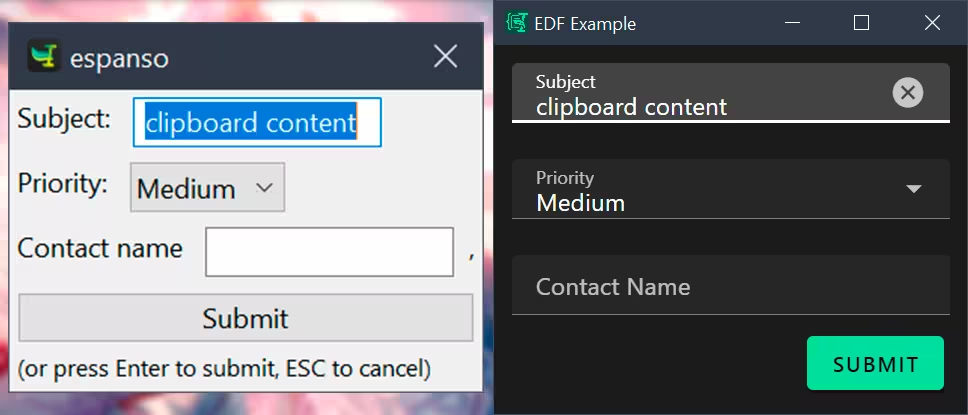 Side-by-side comparison of an Espanso form (left) and an Espanso Dynamic Forms form (right).
Key Differences
| Feature | Espanso Forms (built-in) | Espanso Dynamic Forms (this app) |
|---|---|---|
| Field Types | Basic types only: text, choice, list | Full JSON Schema support with custom renderers (file uploads, dates, arrays, etc.) |
| Layout Control | Simple inline layout with [[field]] syntax | Flexible UI Schema with VerticalLayout, HorizontalLayout, Categorization, groups, and conditional visibility |
| Validation | No built-in validation | JSON Schema validation with AJV (required fields, type checking, patterns, etc.) |
| Output Formatting | Static template with basic variable substitution | Liquid template engine with filters, control flow, and loops |
| File Handling | Not supported | Custom file upload controls with metadata extraction |
| Dynamic Values | {{clipboard}} token only | {{clipboard}} and {{env.VAR}} tokens for environment variables |
| Internationalization | Not supported | i18n support for multi-language interfaces |
| Configuration Format | Inline YAML within Espanso config | Separate YAML/JSON files |
| UI Components | Basic native form controls | Material Design components via Vuetify 3 |
Compare Example Forms
The following examples show a native Espanso form and its equivalent in Espanso Dynamic Forms config.
Espanso Forms
yaml
  - trigger: :email
    replace: |
      Subject: {{form1.subject}}
      Priority: {{form1.priority}}

      ---

      Hi {{form1.contact_name}},

      Just following up on our conversation about {{form1.subject}}.

      Regards,
      Me
    vars:
      - name: "form1"
        type: form
        params:
          layout: |
            Subject: [[subject]]
            Priority: [[priority]]
            Contact name [[contact_name]],
          fields:
            subject:
              type: text
              multiline: false
              default: "{{clipboard}}"
            priority:
              type: choice
              values:
                - High
                - Medium
                - Low
              default: Medium
            contact_name:
              type: text
              multiline: false
              default: ""
Espanso Dynamic Forms
yaml
schema:
  type: object
  properties:
    subject:
      type: string
    priority:
      type: string
      enum:
        - High
        - Medium
        - Low
    contactName:
      type: string

uischema:
  type: VerticalLayout
  elements:
    - type: Control
      scope: "#/properties/subject"
      options:
        multi: false
    - type: Control
      scope: "#/properties/priority"
      options:
        format: radio
    - type: Control
      scope: "#/properties/contactName"
      options:
        multi: false

data:
  subject: "{{clipboard}}"
  priority: Medium
  contactName: ""

template: |
  Subject: {{subject}}
  Priority: {{priority | upcase}}

  ---

  Hi {{contactName | capitalize}},

  Just following up on our conversation about {{subject}}.

  Regards,
  Me
When to Use Which
| Scenario | Recommendation |
|---|---|
| Quick text input (1-2 fields) | Built-in Espanso forms |
| Need validation (required fields, patterns) | Espanso Dynamic Forms |
| Complex layout (tabs, groups, conditional fields) | Espanso Dynamic Forms |
| File uploads or date pickers | Espanso Dynamic Forms |
| Multi-language support | Espanso Dynamic Forms |
| Liquid templating with filters and loops | Espanso Dynamic Forms |
Espanso Dynamic Forms is more powerful, but built-in forms are simpler for basic needs. Choose based on your specific requirements.