i18n
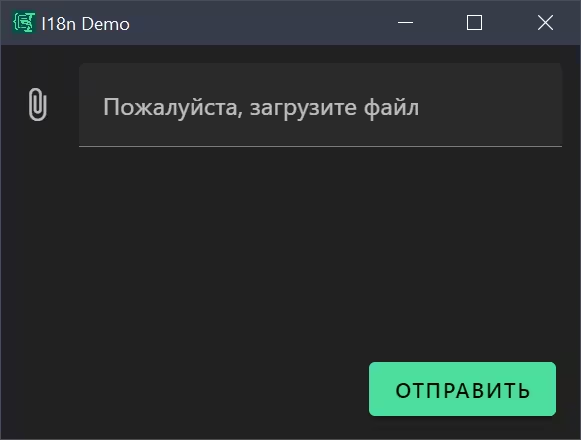
i18n (short for "internationalization") lets you translate form labels and messages into multiple languages. Users see text in their preferred language based on the LOCALE environment variable.
Optional Section
If you skip this section, all text uses English defaults.
Structure
Translations are defined per config using a nested structure:
i18n:
  <locale-code>:
    <translation-key>:
      <property>: <translated-text>
Example
The following example shows the complete translation structure for file input controls:
i18n:
  en:
    file:
      label: Please upload
      selectedFiles: Selected files
      remove: Remove
      fileNumber: File {index}
Translation Key Assignment
Schema properties reference translation keys using i18n property:
schema:
  properties:
    myFilesPicker:
      type: array
      format: file
      i18n: file  # References the "file" translation key
This mechanism allows multiple fields to share the same translation key, promoting reusability.
Locale Configuration
Environment Variable
The active locale is determined by the LOCALE environment variable, which can be set when invoking the application:
# Espanso match configuration
- trigger: ':myform'
  replace: '{{output}}'
  force_mode: clipboard
  vars:
    - name: output
      type: script
      params:
        args:
          - C:/Program Files/Espanso Dynamic Forms/EDF.exe
          - --form-config
          - <path-to-form-config>
          - --env
          - LOCALE=de  # Set locale to German
Fallback Behavior
Locale resolution will first check env.LOCALE from environment variables, then fall back to "en" (English) if not set.
Variable Interpolation
Translation strings support variable interpolation using curly brace syntax:
i18n:
  en:
    file:
      fileNumber: File {index}  # {index} will be replaced with actual value
This allows dynamic content within translated strings, such as:
- File numbers in multi-file uploads
- Item counts in arrays
- User-provided values
Interpolation is handled by the JSON Forms translation system when rendering field labels and descriptions.
Complete Example: File Form
The file form demonstrates comprehensive i18n usage:
schema:
  type: object
  properties:
    singleFile:
      type: object
      format: file
      i18n: file
    multipleFiles:
      type: array
      format: file
      i18n: file

uischema:
  type: VerticalLayout
  elements:
    - type: Control
      scope: "#/properties/singleFile"
      label: File
      options:
        accept: "text/*"
    - type: Control
      scope: "#/properties/multipleFiles"
      label: Files
      options:
        accept: "image/*"

i18n:
  en:
    file:
      label: Please upload
      selectedFile: Selected file
      selectedFiles: Selected files
      remove: Remove
      fileNumber: File {index}
  ru:
    file:
      label: Пожалуйста, загрузите
      selectedFile: Выбранный файл
      selectedFiles: Выбранные файлы
      remove: Удалить
      fileNumber: Файл {index}

template: |
  Single file contents:
  ```singleFile.extension
  {{ singleFile.text }}
  ```

  Multiple files:
  {% for f in multipleFiles %}
  ```
  {{ f.fullName }} ({{ f.size }} bytes): {{ f.hash }}
  ```
  {% endfor %}
Both singleFile and multipleFiles fields reference the same translation key, sharing translations while renderers automatically adapt labels based on whether the field is singular or plural.