data
The data section sets default values for your form fields. When the form opens, fields are pre-filled with these values instead of being empty.
You can use static values (like "Hello" or 42) or dynamic tokens that are evaluated when the form loads (like {{clipboard}} to grab clipboard content).
Optional Section
If you skip this section, fields start empty or with their schema-defined defaults.
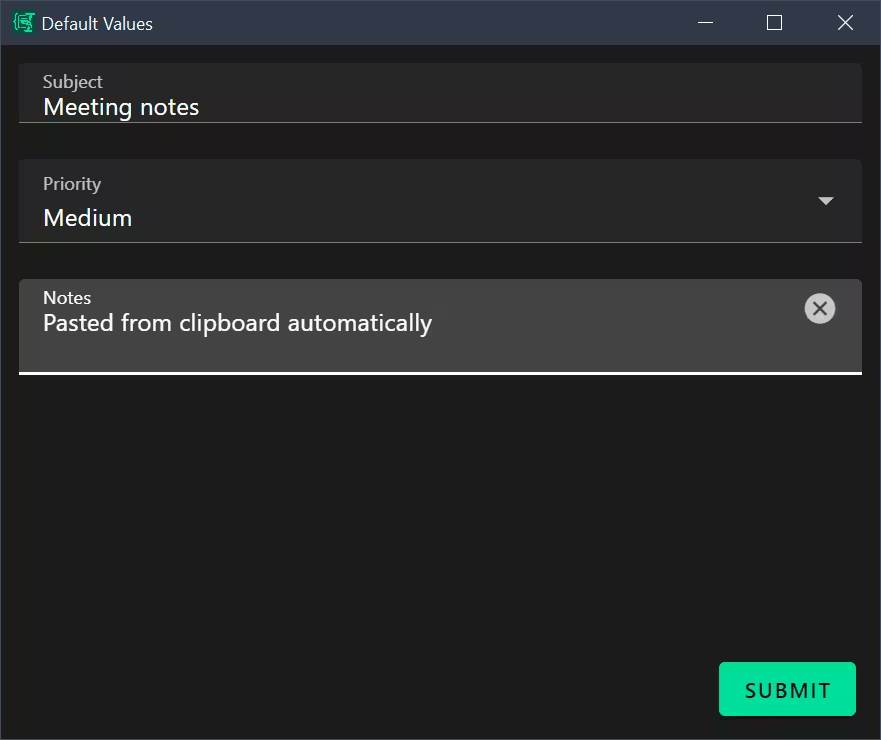 Form fields initialized with static values and dynamic tokens from
 data
Variable Precedence
When determining the initial value of a field, Espanso Dynamic Forms follows this order of precedence (highest to lowest):
- Data Section: Values defined in
data(including those resolved from{{tokens}}). - Schema Defaults: Values defined by
defaultkeyword inschema.
If a field is not present in data and has no default in schema, it starts empty (null/undefined).
Basic Structure
data:
  fieldName: "static value"
  anotherField: 42
  checkboxField: true
  arrayField: []
  dynamicField: "{{clipboard}}"
Static Default Values
Static defaults are literal values assigned to form fields. They match data types defined in schema.
| Data Type | Example Default Value |
|---|---|
| String | myField: "Hello World" |
| Number | quantity: 10 |
| Boolean | enabled: true |
| Array (empty) | selections: [] |
| Array (with values) | tags: ["tag1", "tag2"] |
| Object | config: { key: "value" } |
Example:
data:
  taskType: discuss
  language: typescript
  requirements:
    - No regressions to existing behavior
    - Match existing code style in the file
Special Token System
Special tokens are dynamic expressions enclosed in double curly braces {{ }} that are evaluated at form initialization. Espanso Dynamic Forms processes these tokens using Liquid template engine before the form renders.
Clipboard Token
{{clipboard}} inserts the current system clipboard text content as the default value for a field:
data:
  body: "{{clipboard}}"
  title: "{{clipboard | truncate: 20}}"
Environment Variable Tokens
{{env.VARIABLE_NAME}} accesses environment variables passed to the application via CLI arguments or the system environment:
data:
  username: "{{env.USER}}"
  locale: "{{env.LOCALE}}"
  projectPath: "{{env.PROJECT_DIR}}"
Date and Time Tokens
Date tokens use Liquid's date filter to format timestamps. Special value 'now' represents the current date/time.
Current Date/Time
data:
  mydate: "{{ 'now' | date: '%Y-%m-%d' }}"
  timestamp: "{{ 'now' | date: '%Y-%m-%d %H:%M:%S' }}"
  today: "{{ 'now' | date: '%A, %B %d, %Y' }}"
Date Format Patterns
Common format patterns follow Shopify Liquid date filter syntax:
| Pattern | Description | Example Output |
|---|---|---|
%Y | Year (4 digits) | 2024 |
%m | Month (01-12) | 03 |
%d | Day (01-31) | 15 |
%A | Weekday name | Monday |
%B | Month name | March |
%H | Hour (00-23) | 14 |
%M | Minute (00-59) | 30 |
%S | Second (00-59) | 45 |
Example from date.yml:
data:
  mydate: "{{ 'now' | date: '%Y-%m-%d' }}"

template: |
  My special date is {{ mydate | date: "%A – %Y • %b • %d" }}
This sets the default to today's date in ISO format (e.g., "2024-03-15"), which can then be reformatted in the template.
Advanced Token Patterns
Combining Tokens with Static Text
data:
  greeting: "Hello {{env.USER}}, your clipboard contains: {{clipboard}}"
  filename: "{{env.PROJECT_NAME}}_{{ 'now' | date: '%Y%m%d' }}.txt"
Conditional Defaults
data:
  code: "{{clipboard}}"
  language: "{% if clipboard contains 'function' %}javascript{% else %}typescript{% endif %}"
Nested Field References
data:
  firstName: "John"
  lastName: "Doe"
  fullName: "{{firstName}} {{lastName}}"
Complete Example
Here is a comprehensive example showing all token types:
schema:
  type: object
  properties:
    username:
      type: string
    clipboardContent:
      type: string
    currentDate:
      type: string
    projectInfo:
      type: string

data:
  # Environment variable token
  username: "{{env.USER}}"

  # Clipboard token
  clipboardContent: "{{clipboard}}"

  # Date token with filter
  currentDate: "{{ 'now' | date: '%Y-%m-%d' }}"

  # Combined tokens with static text
  projectInfo: "User {{env.USER}} working on {{env.PROJECT_NAME}} at {{ 'now' | date: '%H:%M' }}"
Processing Result (example):
username: "john_doe",
clipboardContent: "some copied text",
currentDate: "2024-03-15",
projectInfo: "User john_doe working on MyProject at 14:30"
Missing Environment Variables
If an environment variable doesn't exist, Liquid renders that token as an empty string:
data:
  value: "{{env.NONEXISTENT}}"  # Results in ""
  combined: "User: {{env.MISSING_VAR}}"  # Results in "User: "