template
The template section defines what text gets inserted when you submit the form. It uses Liquid template language to transform your form data into formatted output.
Every field from your schema becomes a variable you can use in the template.
Required Section
Every form config must include a template. This is the output from your form.
Basic Structure
Use {{fieldName}} to insert field values:
template: |
  Subject: {{subject}}
  Priority: {{priority}}

  Hi {{contact_name}},

  Just following up on our conversation about {{subject}}.
The | after template: enables multi-line text. Each line becomes part of your output.
Using Filters
Filters transform values before inserting them. Apply filters with pipe symbol |:
template: |
  Name: {{name | capitalize}}
  Priority: {{priority | upcase}}
  Word count: {{content | split: ' ' | size}}
Common filters:
| Filter | What It Does | Example |
|---|---|---|
upcase | UPPERCASE | {{text | upcase}} → HELLO |
downcase | lowercase | {{text | downcase}} → hello |
capitalize | First letter uppercase | {{text | capitalize}} → Hello |
strip | Remove leading/trailing whitespace | {{text | strip}} |
size | Count characters or array items | {{text | size}} → 5 |
default | Fallback if empty | {{name | default: 'Anonymous'}} |
See all filters here: https://liquidjs.com/filters/overview.html
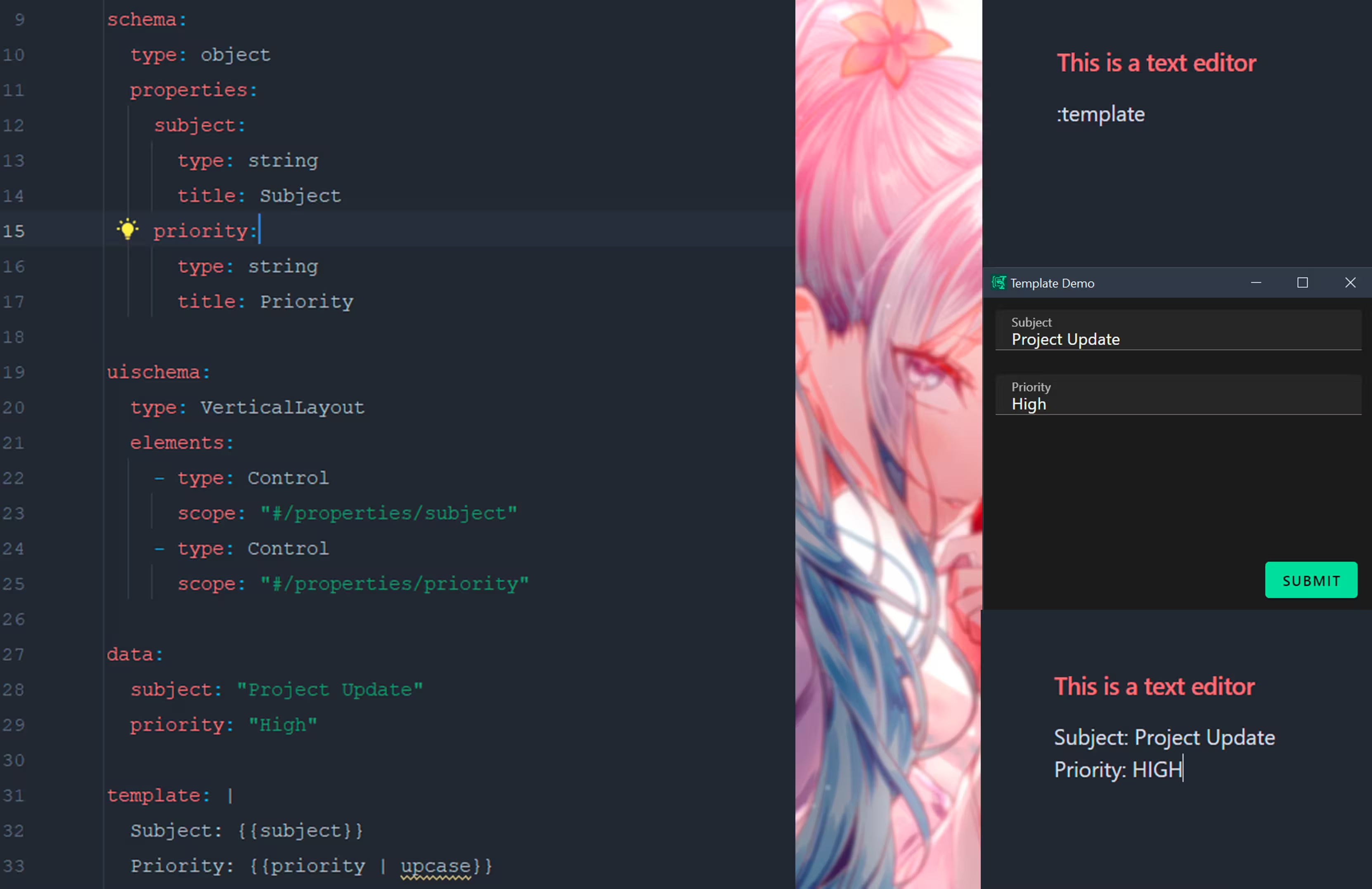 Form config on the left, generated output on the right
Conditionals
Show content only when conditions are met:
template: |
  Subject: {{subject}}
  {% if priority == 'High' %}
  ⚠️ URGENT: Please review immediately
  {% endif %}

  {% if notes != blank %}
  Notes:
  {{notes}}
  {% endif %}
Use blank to check for empty strings. Use nil to check for missing values.
Loops
Iterate over arrays:
template: |
  Selected items:
  {% for item in selections %}
  - {{item}}
  {% endfor %}
Special Variables
Beyond your form fields, you can access:
| Variable | Description |
|---|---|
{{clipboard}} | System clipboard content at form load |
{{env.VARIABLE_NAME}} | Environment variables |
{{newline}} | A newline character (\n) |
{{tab}} | A tab character (\t) |
template: |
  User: {{env.USERNAME}}
  Original text: {{clipboard}}
  Your response: {{response}}

  Items:{{newline}}{{items | join: newline}}
Best Practices
| Practice | Why | Example |
|---|---|---|
Check for blank before rendering | Prevents empty sections | {% if notes != blank %} |
Use size > 0 for arrays | Ensures array has items | {% if items.size > 0 %} |
Use default filter | Provides fallback values | {{name | default: 'N/A'}} |
Use strip on user input | Removes accidental whitespace | {{input | strip}} |
Editor Tips
Add #language=liquid immediately before the template: section to get Liquid syntax highlighting in JetBrains IDEs:
data:
  items: []

#language=liquid
template: |
  {% if items.size > 0 %}
  - {{ items | join: "\n- " }}
  {% endif %}
Learn More
- Liquid Templating — Full syntax reference
- Environment Variables — Passing dynamic data via
{{env}} - Clipboard — Using clipboard content