Files Form
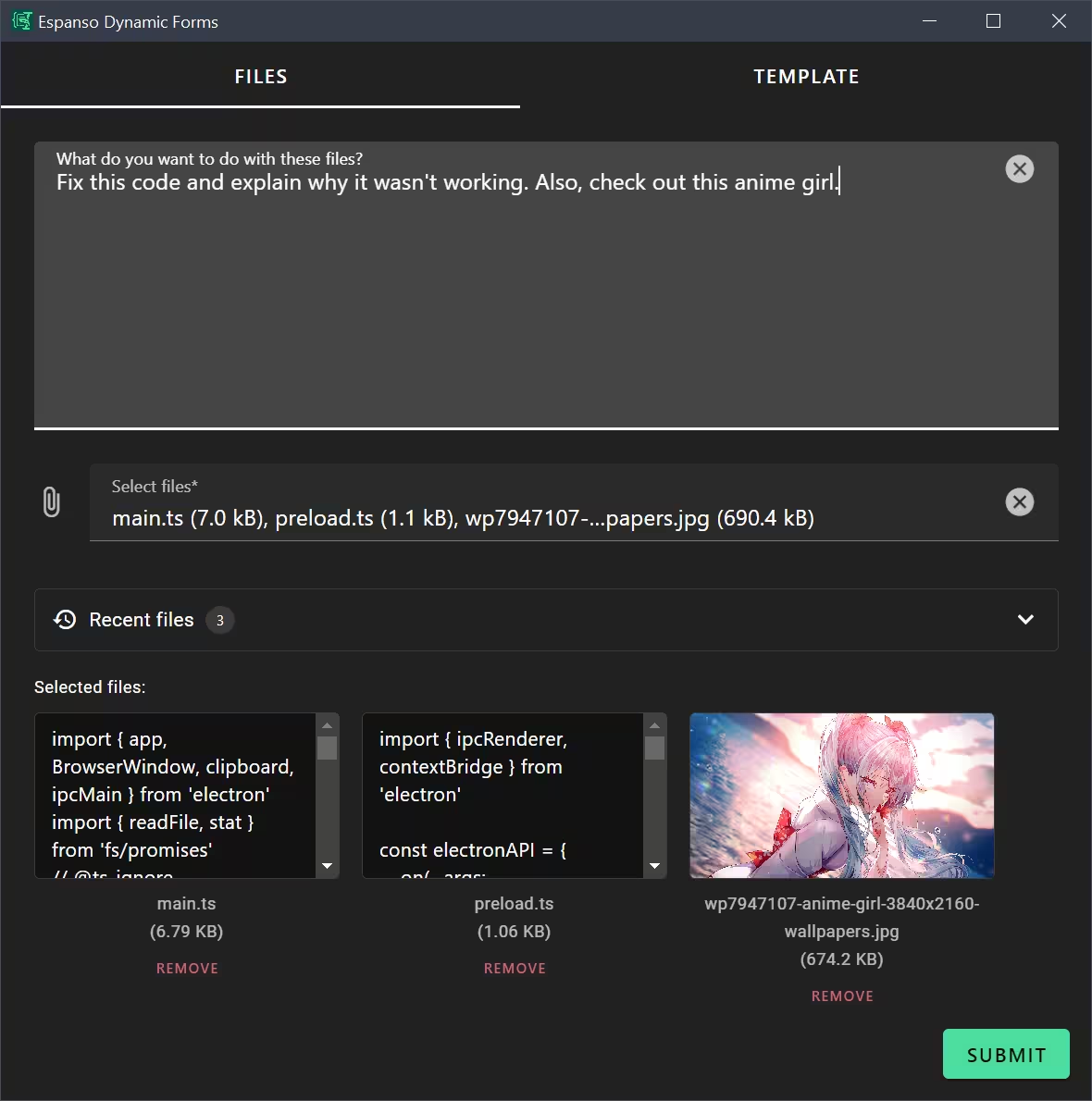
An advanced file handling form with multiple output templates and recent files support.
Source: files.yml
What It Does
This is a power-user form for batch file processing. Select multiple files, choose an output template, and get formatted content. It demonstrates:
- Recent files feature
- Template selector with conditional visibility
- Multiple template definitions
- The
render_templatefilter for dynamic templates - Tab-based organization
Use Case
Process multiple files with different output formats—create code context for AI, generate file manifests, build documentation, or any batch file operation.
Example output (Simple template):
# File 1: main.ts
````ts
import { app } from './app';
app.run();
````

# File 2: config.yml
````yml
port: 3000
````
Demonstration of the Files form in action
Available Templates
| Template | Output Style |
|---|---|
| Simple | Basic file content with code fences |
| Markdown List | Detailed list with metadata |
| Table Summary | Markdown table of file info |
| Code Context | Rich format for AI code context |
| File Manifest | Bullet list with properties |
| Archive Contents | Numbered simple list |
Form Configuration (Key Sections)
Schema
schema:
  type: object
  properties:
    description:
      type: string
    templateSelector:
      type: string
      enum:
        - Simple
        - Markdown List
        - Table Summary
        - Code Context
        - File Manifest
        - Archive Contents
    simpleTemplate:
      type: string
    # ... other template fields
    files:
      type: array
      format: file
  required:
    - files
UI Schema with Recent Files
- type: Control
  scope: '#/properties/files'
  label: Select files
  options:
    accept: '*'
    recentFiles:
      enabled: true
      maxItems: 100
Template Selection with Conditional Visibility
- type: Control
  scope: '#/properties/simpleTemplate'
  rule:
    effect: SHOW
    condition:
      scope: '#/properties/templateSelector'
      schema:
        const: Simple
Dynamic Template Rendering
template: |
  {% case templateSelector %}
  {% when 'Simple' %}
  {% assign activeTemplate = simpleTemplate %}
  {% when 'Markdown List' %}
  {% assign activeTemplate = markdownListTemplate %}
  {% endcase %}

  {% for file in files -%}
  {{activeTemplate | render_template: file}}
  {% endfor %}
Key Features
Recent Files Support
Enable quick access to recently used files:
options:
  recentFiles:
    enabled: true
    maxItems: 100
Recent Files Options
| Option | Type | Default | Description |
|---|---|---|---|
enabled | boolean | false | Enable recent files feature |
maxItems | number | 10 | Maximum number of files to store in history |
namespace | string | — | Share history between fields with the same namespace |
historyKey | string | — | Explicit storage key for complete control over history scope |
Sharing history across fields:
Use namespace to share recent files between different file input fields:
# Both fields share the same recent files history
- type: Control
  scope: '#/properties/sourceFiles'
  options:
    recentFiles:
      enabled: true
      namespace: code-files

- type: Control
  scope: '#/properties/testFiles'
  options:
    recentFiles:
      enabled: true
      namespace: code-files
The render_template Filter
This special filter renders a template string with a given context:
{{activeTemplate | render_template: file}}The file object becomes available in the template as file.name, file.text, etc.
Template Variables
Each template can use these variables:
| Variable | Description |
|---|---|
file.name | Filename without extension |
file.fullName | Filename with extension |
file.extension | File extension |
file.text | File content |
file.size | Size in bytes |
file.mime | MIME type |
file.hash | SHA-256 hash |
forloop.index | 1-based loop counter |
forloop.first | True if first iteration |
Using {% raw %} in Templates
Templates stored as data need {% raw %} to prevent early evaluation:
simpleTemplate: |
  {% raw %}# File {{forloop.index}}: {{file.fullName}}
  ````{{file.extension}}
  {{file.text}}
  ````{% endraw %}
Espanso Trigger
matches:
  - trigger: ':files'
    replace: '{{output}}'
    force_mode: clipboard
    vars:
      - name: output
        type: script
        params:
          args:
            - C:/Program Files/Espanso Dynamic Forms/EDF.exe
            - --form-config
            - \{\{env.EDF_FORMS}}/files.yml
Customization Ideas
- Create custom templates for your specific file-processing needs
- Add file type filtering (only code files, only images)
- Build templates for specific programming languages
- Add a description prefix that appears before files
- Create a "diff" template comparing two files