Demo Form
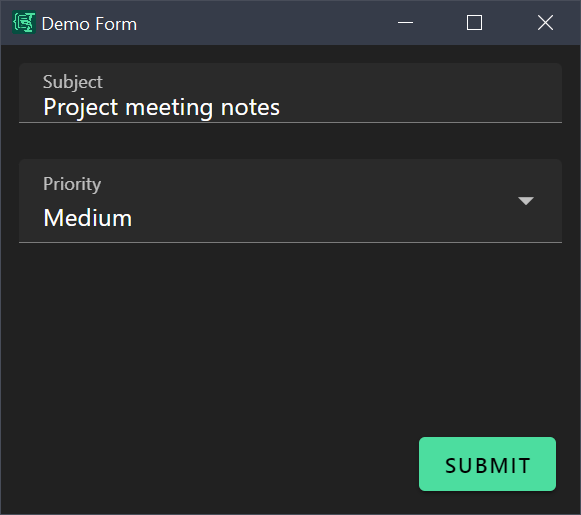
A simple form to test your Espanso Dynamic Forms installation and understand the basics.
Source: demo.yml
What It Does
This form collects a subject line and priority level, then outputs them in a formatted structure. It demonstrates:
- Text input with clipboard pre-fill
- Dropdown selection with enum values
- Liquid filters for output formatting
Use Case
Use this form when you need to quickly capture a subject and priority for notes, tasks, or messages.
Example output:
Subject: Meeting notes from standup
Priority: HIGH
Form Configuration
yml
schema:
  type: object
  properties:
    subject:
      type: string
    priority:
      type: string
      enum:
        - High
        - Medium
        - Low
  required:
    - subject

uischema:
  type: VerticalLayout
  elements:
    - type: Control
      scope: "#/properties/subject"
      label: Subject
    - type: Control
      scope: "#/properties/priority"
      label: Priority

data:
  subject: "{{clipboard}}"
  priority: Medium

template: |
  Subject: {{subject}}
  Priority: {{priority | upcase}}
Key Features
Clipboard Pre-fill
The subject field is pre-filled with whatever text is in your clipboard when the form opens:
yml
data:
  subject: "{{clipboard}}"
Dropdown with Default
The priority field uses an enum to show a dropdown with three options, defaulting to "Medium":
yml
priority:
  type: string
  enum:
    - High
    - Medium
    - Low
Output Formatting
The upcase filter converts priority to uppercase in output:
yml
template: |
  Priority: {{priority | upcase}}
Espanso Trigger
Add this to your Espanso config to use the demo form:
yml
matches:
  - trigger: ':demo'
    replace: '{{output}}'
    force_mode: clipboard
    vars:
      - name: output
        type: script
        params:
          args:
            - C:/Program Files/Espanso Dynamic Forms/EDF.exe
            - --form-config
            - \{\{env.EDF_FORMS}}/demo.yml
Customization Ideas
- Add more priority levels (e.g., "Critical", "Low", "None")
- Add a notes field with
multi: truefor longer text - Change the template to output Markdown format
- Add a category dropdown for organizing subjects