Code Generator Form
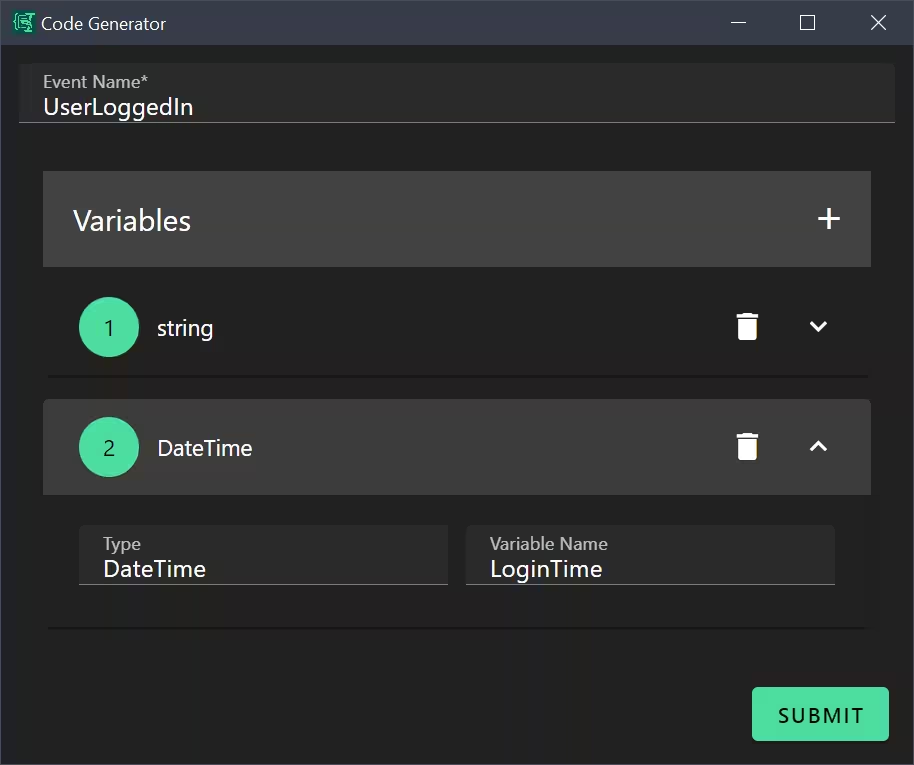
A form for generating C# EventArgs classes with dynamic property definitions.
Source: codegen.yml
What It Does
This form generates C# EventArgs class code based on user-defined properties. It demonstrates:
- Dynamic arrays with object items
- Detail layout for array items (horizontal sub-form)
- Complex Liquid template logic
- Code generation patterns
Use Case
When you need to create C# event argument classes, use this form to quickly generate boilerplate code with proper constructor and readonly fields.
Example output:
csharp
public class UserLoggedInEventArgs : EventArgs
{
    public readonly string Username;
    public readonly DateTime LoginTime;

    public UserLoggedInEventArgs(string Username, DateTime LoginTime)
    {
        this.Username = Username;
        this.LoginTime = LoginTime;
    }
}
Form Configuration
yml
schema:
  type: object
  properties:
    eventName:
      type: string
    variables:
      type: array
      items:
        type: object
        properties:
          type:
            type: string
          name:
            type: string
  required:
    - eventName

uischema:
  type: VerticalLayout
  elements:
    - type: Control
      scope: "#/properties/eventName"
      label: Event Name
      options:
        focus: true
    - type: Control
      scope: "#/properties/variables"
      label: Variables
      options:
        detail:
          type: HorizontalLayout
          elements:
            - type: Control
              scope: "#/properties/type"
              label: Type
            - type: Control
              scope: "#/properties/name"
              label: Variable Name

data:
  variables:
    - type: ""
      name: ""

template: |
  public class {{eventName}}EventArgs : EventArgs
  {
  {% for v in variables %}{% if v.type != blank and v.name != blank %}
      public readonly {{v.type}} {{v.name}};
  {% endif %}{% endfor %}
      public {{eventName}}EventArgs({% assign firstParam = true %}{% for v in variables %}{% if v.type != blank and v.name != blank %}{% unless firstParam %}, {% endunless %}{{v.type}} {{v.name}}{% assign firstParam = false %}{% endif %}{% endfor %})
      {
  {% for v in variables %}{% if v.type != blank and v.name != blank %}
          this.{{v.name}} = {{v.name}};
  {% endif %}{% endfor %}
      }
  }
Key Features
Dynamic Arrays with Object Items
Each array item is an object with multiple properties:
yml
variables:
  type: array
  items:
    type: object
    properties:
      type:
        type: string
      name:
        type: string
Detail Layout
The detail option defines how each array item is rendered:
yml
options:
  detail:
    type: HorizontalLayout
    elements:
      - type: Control
        scope: "#/properties/type"
        label: Type
      - type: Control
        scope: "#/properties/name"
        label: Variable Name
This creates a horizontal row for each variable with Type and Name side by side.
Auto-focus
Set focus to the first field when the form opens:
yml
options:
  focus: true
Complex Template Logic
Filtering empty entries:
yml
{% if v.type != blank and v.name != blank %}Comma-separated parameters:
yml
{% assign firstParam = true %}
{% for v in variables %}
  {% unless firstParam %}, {% endunless %}
  {{v.type}} {{v.name}}
  {% assign firstParam = false %}
{% endfor %}
Espanso Trigger
yml
matches:
  - trigger: ':codegen'
    replace: '{{output}}'
    force_mode: clipboard
    vars:
      - name: output
        type: script
        params:
          args:
            - C:/Program Files/Espanso Dynamic Forms/EDF.exe
            - --form-config
            - \{\{env.EDF_FORMS}}/codegen.yml
Customization Ideas
- Add a namespace field
- Include XML documentation comments
- Add access modifiers (public/private/internal)
- Create templates for other languages (TypeScript interfaces, Python dataclasses)
- Add a base class selector
- Include common event patterns (INotifyPropertyChanged)