Checkbox Form
A form demonstrating multi-select checkbox groups with array output formatting.
Source: checkbox.yml
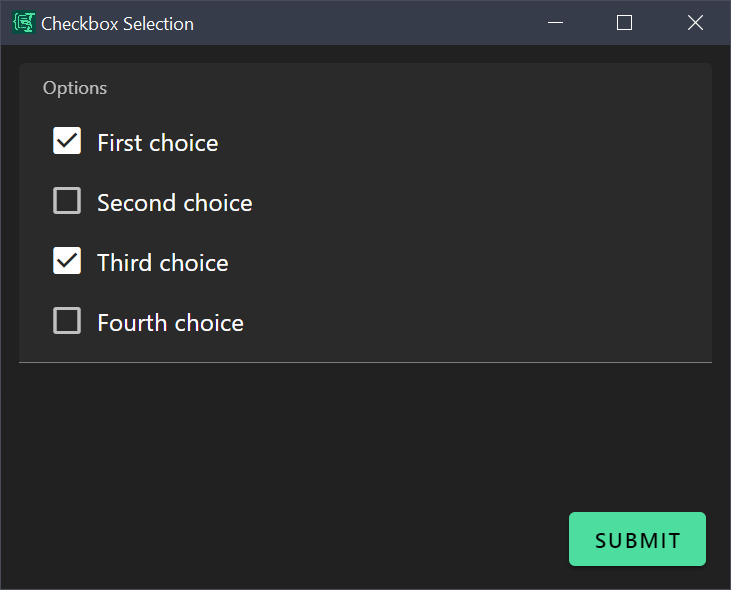 Screenshot of the Checkbox form with multiple checkboxes selected
What It Does
This form shows how to create a multi-select checkbox group where users can select multiple options from a predefined list. It demonstrates:
- Array field with enum items
- Checkbox format rendering
uniqueItemsto prevent duplicates- Conditional output based on selection count
- Array joining with Liquid filters
Use Case
Create quick checklists for preferences, requirements, selected items, or any multi-choice scenario.
Example output (with selections):
You selected:
- First choice
- Third choice
Example output (no selections):
No items selectedForm Configuration
yml
schema:
  type: object
  properties:
    selections:
      type: array
      items:
        type: string
        enum:
          - First choice
          - Second choice
          - Third choice
          - Fourth choice
      uniqueItems: true

uischema:
  type: VerticalLayout
  elements:
    - type: Control
      scope: "#/properties/selections"
      label: Select Your Options
      options:
        format: checkbox
        vuetify:
          v-input:
            class: vertical

data:
  selections: []

template: |
  {% if selections.size > 0 %}
  You selected:
  - {{ selections | join: "\n- " }}
  {% else %}
  No items selected
  {% endif %}
Key Features
Checkbox Array Schema
Define an array with an enum to create checkboxes:
yml
selections:
  type: array
  items:
    type: string
    enum:
      - First choice
      - Second choice
      - Third choice
  uniqueItems: true  # Prevent selecting same item twice
Checkbox Format
Tell the renderer to display as checkboxes (not a multi-select dropdown):
yml
options:
  format: checkbox
  vuetify:
    v-input:
      class: vertical  # Stack vertically instead of inline
Conditional Output
Handle the case when nothing is selected:
yml
{% if selections.size > 0 %}
You selected:
- {{ selections | join: "\n- " }}
{% else %}
No items selected
{% endif %}
Array Joining
Convert array items to a bulleted list:
yml
{{ selections | join: "\n- " }}This outputs:
- First choice
- Third choice
Espanso Trigger
yml
matches:
  - trigger: ':check'
    replace: '{{output}}'
    force_mode: clipboard
    vars:
      - name: output
        type: script
        params:
          args:
            - C:/Program Files/Espanso Dynamic Forms/EDF.exe
            - --form-config
            - \{\{env.EDF_FORMS}}/checkbox.yml
Customization Ideas
- Add your own options relevant to your workflow
- Create multiple checkbox groups for different categories
- Add a "Select All" option using Liquid logic
- Output as comma-separated list instead of bullets
- Add a minimum/maximum selection requirement
- Group related options into separate arrays