Environment Variables
Environment variables let you pass dynamic data into your forms without hardcoding values. You can access them in your form config using {{env.VARIABLE_NAME}}.
Espanso Dynamic Forms gives you access to:
- System environment variables (like
USERNAME,HOME,PATH) - Custom variables you pass via the
--envargument - Built-in EDF variables (prefixed with
EDF_)
Using Environment Variables
In the Data Section
Pre-fill form fields with environment variable values:
schema:
  type: object
  properties:
    author:
      type: string

uischema:
  type: VerticalLayout
  elements:
    - type: Control
      scope: "#/properties/author"

data:
  author: "{{env.USERNAME}}"

template: |
  Author: {{author}}
When the form opens, the author field is pre-filled with the current user's name.
In the Template Section
Include environment data directly in your output:
schema:
  type: object
  properties:
    message:
      type: string

uischema:
  type: VerticalLayout
  elements:
    - type: Control
      scope: "#/properties/message"

data:
  message: ""

template: |
  From: {{env.USERNAME}}
  Machine: {{env.COMPUTERNAME}}

  {{message}}
This adds the username and computer name to every output, regardless of what the user types.
In Espanso Triggers
Reference environment variables in your trigger's --form-config path:
matches:
  - trigger: ':demo'
    replace: '{{output}}'
    force_mode: clipboard
    vars:
      - name: output
        type: script
        params:
          args:
            - C:/Program Files/Espanso Dynamic Forms/EDF.exe
            - --form-config
            - \{\{env.EDF_FORMS}}/demo.yml
The EDF_FORMS variable points to the bundled example forms, so this trigger loads the demo form from the installation directory.
Why the backslashes?
The backslashes (\{\{) escape the curly braces so Espanso passes them literally to Espanso Dynamic Forms instead of trying to process them itself. Alternatively, add inject_vars: false to your trigger. See Espanso's documentation for details.
Passing Custom Environment Variables
Use the --env argument to pass custom variables from your Espanso trigger:
matches:
  - trigger: ':project'
    replace: '{{output}}'
    force_mode: clipboard
    vars:
      - name: output
        type: script
        params:
          args:
            - C:/Program Files/Espanso Dynamic Forms/EDF.exe
            - --form-config
            - C:/forms/project-note.yml
            - --env
            - PROJECT_NAME=MyApp
            - --env
            - TEAM=Backend
In your form config, access these with {{env.PROJECT_NAME}} and {{env.TEAM}}.
Multiple variables
Repeat --env for each variable you want to pass.
Debugging Environment Variables
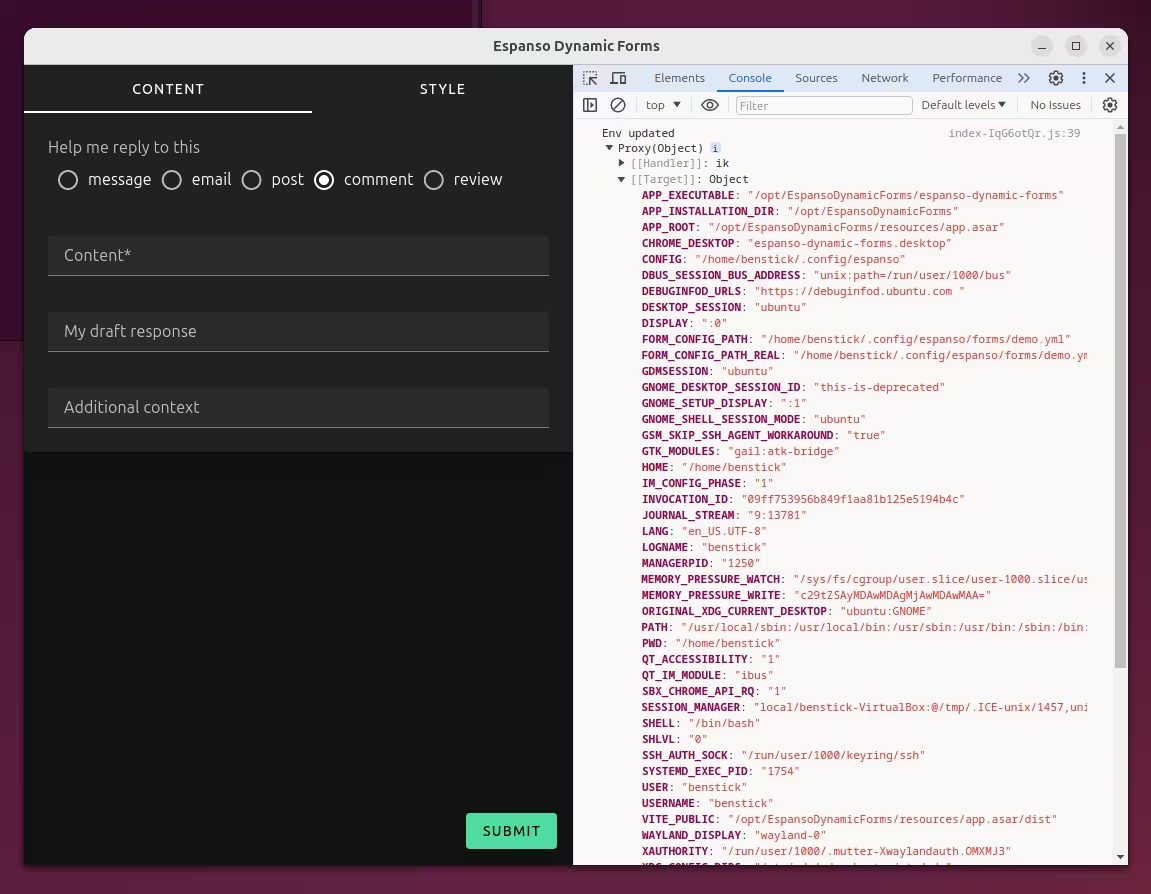
To see all available environment variables while a form is open:
- Press
Ctrl+Shift+Ito open Developer Tools - Look in the Console tab for the logged environment object
Built-in Variables
EDF Variables
Espanso Dynamic Forms provides these variables automatically:
| Variable | Description | Example Value |
|---|---|---|
EDF_EXECUTABLE | Full path to the EDF executable | C:/Program Files/Espanso Dynamic Forms/EDF.exe |
EDF_INSTALLATION_DIR | Installation directory | C:/Program Files/Espanso Dynamic Forms |
EDF_RESOURCES | Path to bundled resources | C:/Program Files/Espanso Dynamic Forms/resources/app.asar/dist |
EDF_FORMS | Path to bundled example forms | C:/Program Files/Espanso Dynamic Forms/resources/app.asar/dist/forms |
EDF_FORM_CONFIG_PATH | The raw --form-config value you passed | {{env.EDF_FORMS}}/demo.yml |
EDF_FORM_CONFIG_PATH_RENDERED | The path after Liquid processing | C:/.../forms/demo.yml |
EDF_FORM_CONFIG_PATH_REAL | The resolved path (resolves symlinks) | C:/.../forms/demo.yml |
Espanso Variables
If Espanso is installed and accessible, these variables are also available:
| Variable | Description | Example Value |
|---|---|---|
ESPANSO_CONFIG | Path to Espanso's config directory | C:/Users/YourName/AppData/Roaming/espanso |
ESPANSO_PACKAGES | Path to Espanso's packages directory | C:/Users/YourName/AppData/Roaming/espanso/match/packages |
ESPANSO_RUNTIME | Path to Espanso's runtime directory | C:/Users/YourName/AppData/Local/espanso |
System Variables
You also have access to all system environment variables like USERNAME, HOME, PATH, COMPUTERNAME, etc.