Form Factory
The Form Factory is an AI-powered form generator. Describe what you want, and it produces a prompt that, when given to an LLM, generates a complete form configuration that you can use directly or customize further.
Source: factory.yml
What It Does
The Form Factory generates a structured prompt that you paste into an AI assistant (ChatGPT, Claude, Gemini, etc.). The AI returns a complete schema, uischema, data, and template configuration ready to use.
This is the fastest way to create new forms, just describe your needs in plain language and let AI handle the JSON Schema details.
✨ Recommended AI Models
Use Claude Sonnet 4.5 or Claude Opus 4.5 for best results. These models understand JSON Schema, produce clean YAML, and more often deliver perfect form configs on the first try: https://claude.ai
How to Use It
Step 1: Trigger the Form Factory
matches:
  - trigger: ':factory'
    replace: '{{output}}'
    force_mode: clipboard
    vars:
      - name: output
        type: script
        params:
          args:
            - C:/Program Files/Espanso Dynamic Forms/EDF.exe
            - --form-config
            - \{\{env.EDF_FORMS}}/factory.yml
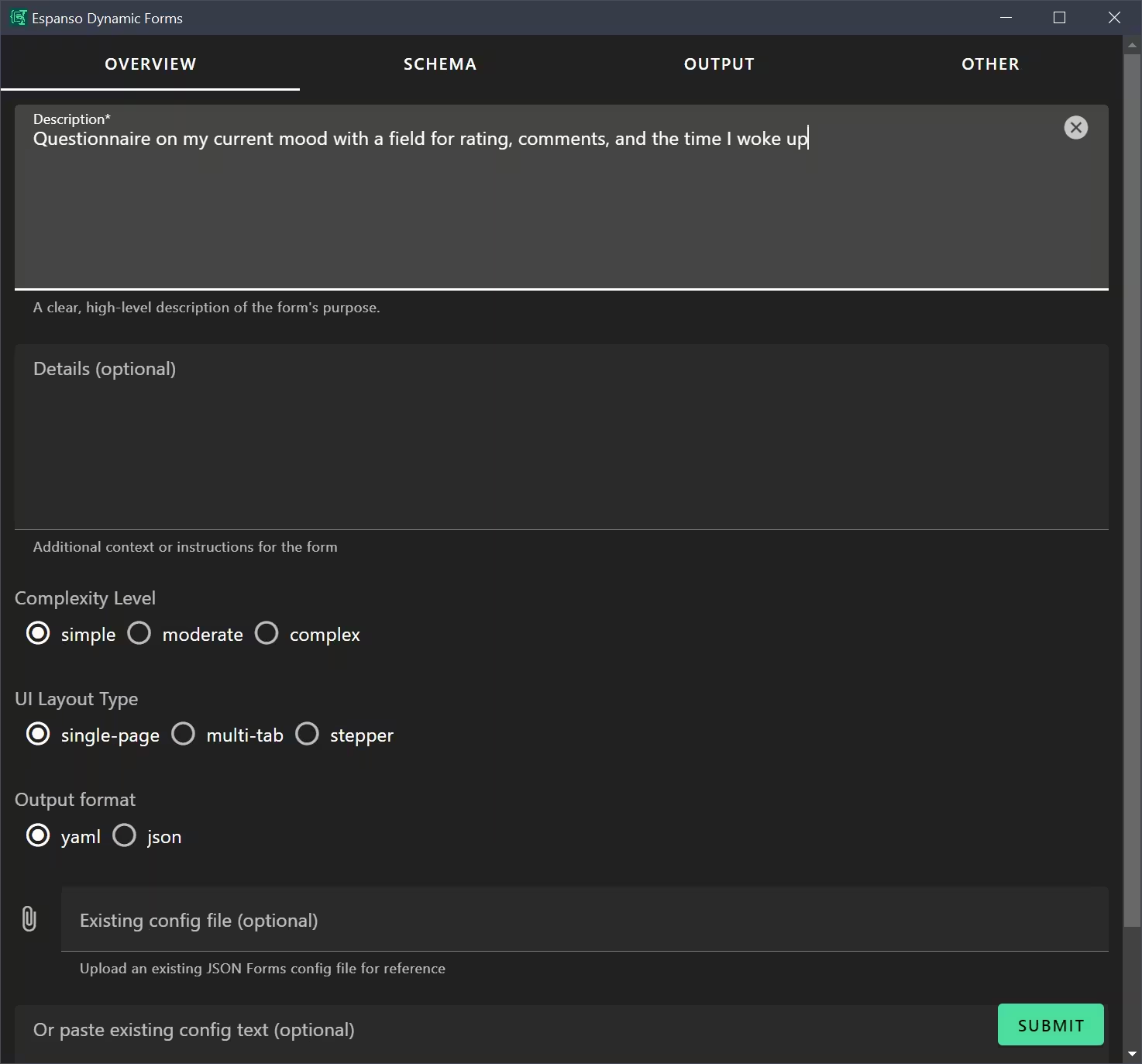
Step 2: Fill in the Form
The only required field is Description. The more details you provide, the better the AI can generate a useful config. All other fields are optional but help refine the output.
Step 3: Submit and Get the Prompt
The form generates a detailed prompt with all your requirements and examples from the library for context.
Step 4: Paste into AI Assistant
Paste the prompt into your AI assistant. It will generate a complete YAML configuration.
Step 5: Save and Use
Copy the AI's output to a .yml file and reference it in your Espanso trigger.
Form Factory Options
Overview Tab
| Field | Description |
|---|---|
| Description | Clear explanation of what the form should do |
| Details | Additional context, constraints, or special requirements |
| Complexity | Simple (few fields), Moderate (some logic), Complex (many features) |
| Layout | Single-page, Multi-tab, or Stepper |
| Max Tabs | For multi-tab/stepper, how many tabs maximum |
| Styling Framework | CSS framework preference (e.g., Vuetify 3) |
| Naming Convention | Variable naming style (camelCase, snake_case, etc.) |
| Output Format | Generate YAML or JSON config |
| Existing Config | Upload or paste an existing config to modify |
Schema Tab
| Field | Description |
|---|---|
| Schema | Describe what fields your form needs |
| UI Schema | Describe layout and styling preferences |
| Defaults | Describe default values for fields |
| Include Rules | Whether to add conditional visibility |
| Rules | Specific conditional visibility requirements |
Output Tab
| Field | Description |
|---|---|
| Template | Describe how the output should be formatted |
| Template Requirements | Specific formatting rules (Markdown, Liquid filters, etc.) |
Other Tab
| Field | Description |
|---|---|
| Example Files | Upload existing configs as reference for the AI |
| Emit Comments | Include explanatory comments in generated config |
| Include i18n | Generate translation support |
| Supported Languages | Which languages to include in i18n |
Example: Creating a Bug Report Form
Description:
Collect bug reports from users with title, severity, steps to reproduce,
expected behavior, and actual behavior.
Details:
This form is for internal QA team to submit bugs to developers.
Include a file upload for screenshots.
Complexity: Moderate
Layout: Multi-tab (2 tabs: "Bug Details" and "Reproduction Steps")
Template:
Generate a GitHub issue format with markdown headers and code blocks for steps.The AI will generate a complete configuration with:
- Required title and severity fields
- Textarea fields for steps, expected, and actual behavior
- File upload for screenshots
- Two-tab layout
- Markdown-formatted output
Tips for Better Results
Be Specific
❌ "A form for notes" ✅ "A form to capture meeting notes with attendees list, action items, and due dates"
Describe Field Types
❌ "Add options for priority" ✅ "Add a radio button group for priority with options: Critical, High, Medium, Low"
Specify Output Format
❌ "Output the data" ✅ "Output as a Markdown document with headers for each section, bullet lists for items"
Include Examples
Upload similar form configs from the library to give the AI context on syntax and style.
Use Complexity Appropriately
- Simple: 1-5 basic fields, no conditional logic
- Moderate: 5-15 fields, some conditional visibility, tabs
- Complex: Many fields, nested objects, arrays, i18n, complex templates
Included Example Files
The Form Factory pre-loads these example configs for the AI to reference:
reply.yml— Tabs, arrays, conditional outputcode.yml— Complex multi-tab, many field typesfile.yml— File uploads, i18ndate.yml— Date picker, Liquid filterscheckbox.yml— Checkbox arrays
Form Configuration Reference
The complete factory.yml configuration is 431 lines. Key sections:
Dynamic Tab Limit
The "Max Tabs" slider only appears for multi-tab layouts:
- type: Control
  scope: '#/properties/maxTabs'
  rule:
    effect: SHOW
    condition:
      scope: '#/properties/layout'
      schema:
        enum:
          - multi-tab
          - stepper
Conditional Text Field
The paste-config field hides when a file is uploaded:
- type: Control
  scope: '#/properties/existingConfigText'
  rule:
    effect: HIDE
    condition:
      scope: '#/properties/existingConfigFile'
      schema:
        type: object
        minProperties: 1
Template with Embedded Files
The template includes full file contents for context:
{% for file in exampleFiles %}
### Example File {{forloop.index}}: {{file.fullName}}
````{{file.extension}}
{{file.text}}
````
{% endfor %}
Customization Ideas
- Add your own example files for project-specific patterns
- Modify default template requirements for your favorite style
- Add project-specific field type presets
- Include custom validators or renderers as requirements