Connect a Custom AI provider
Use Custom when an AI service or self-hosted server offers an OpenAI-compatible API but does not have its own provider choice in Definer.
Collect the connection details
Find these values in the provider's documentation or dashboard:
- The complete OpenAI-compatible API Host or base URL. It often ends in
/v1. - The exact Model name or ID.
- An API Key, when the service requires one.
An account website address is not necessarily the API Host. Copy the base URL given in the provider's API documentation, including any path such as /v1.
Create an API key
If the provider requires a key:
- Sign in to its developer dashboard.
- Open the section named API keys, Keys, Developer settings, or similar.
- Create a key and copy it when it appears. Many providers show the complete key only once.
WARNING
Treat an API key like a password. Do not include it in screenshots, public posts, or source files you share. Revoke it in the provider dashboard if it is exposed.
Enter the details in Definer
- Open Definer Options → Sources → AI → Settings → Main.
- Choose Custom under Provider.
- Enter the exact provider model ID under Model.
- Enter the complete compatible base URL under API Host, such as
https://api.example.com/v1. - Paste the API Key when the provider requires one. Leave it empty for a keyless local server.
- Enter a representative question in Preview and confirm that a response appears.
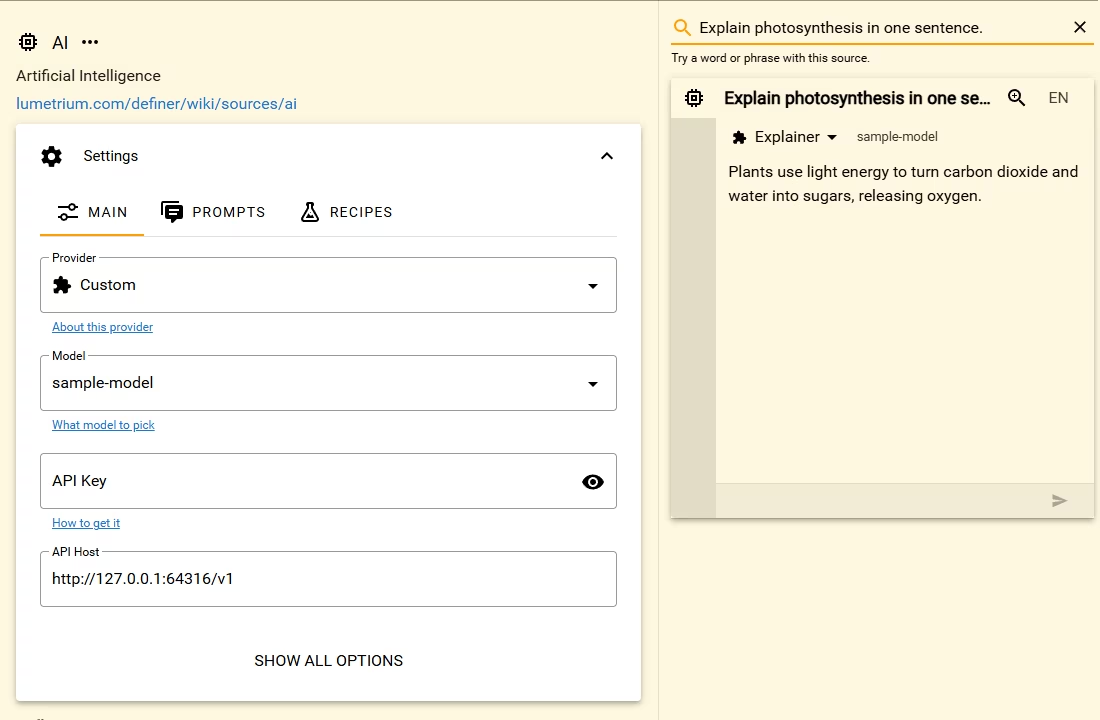
The AI Source now uses this Custom connection for prompts that inherit its Main settings.
Fix a connection problem
- Model not found: Copy the model ID exactly as the provider lists it. Some services include an organization or provider prefix.
- Not found or unsupported endpoint: Check that API Host is the complete compatible base URL and still includes a required path such as
/v1. - Invalid API key: Paste the key again without leading or trailing spaces, then confirm in the provider dashboard that it is active and can use the selected model.
- Connection failed: Confirm that the service or local server is running and that its address opens from the same computer as Definer.
See Custom AI provider for compatible-service examples and the difference between the OpenAI and Custom choices.