Lumetrium AI
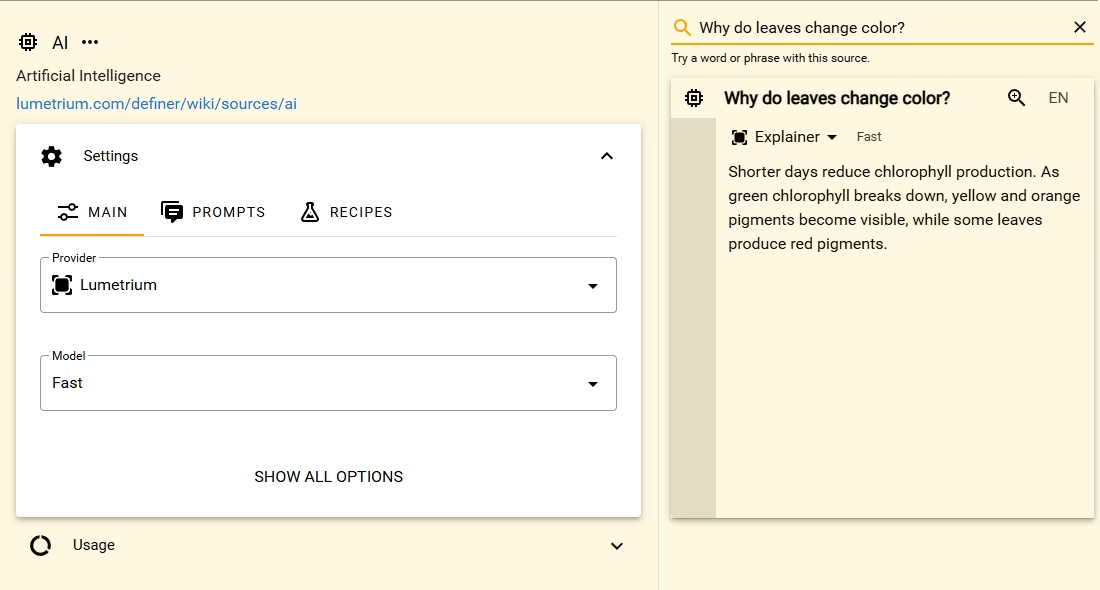
Lumetrium AI is the shortest way to start the AI Source. Choose Fast to generate responses without creating an API key or configuring an external provider account.
Start with Fast
- Open Definer Options → Sources.
- Select Settings for the AI Source and open Main.
- Choose Lumetrium as Provider and Fast as Model.
- Enter a representative query in the Source preview and press Enter.
The response appears in the preview. The same provider and model are used for ordinary lookups unless a prompt has its own override.
Choose another Lumetrium model
The Model menu shows the Lumetrium choices available for your account. A locked model isn't available with the current access, so choose an available model.
Run the same representative lookup with each available choice, then compare the responses. For more guidance, see AI Models.
Continue after included usage runs out
If Definer says your included Lumetrium AI usage is used up, you can review the membership option in that message or choose another provider and enter its API key. Your AI prompts remain available when you change providers.