Script API reference
Every Script runs in a browser document with a constrained definer API. The API is also available as window.definer, but normal scripts can use the shorter definer name directly.
The runtime executes your code inside an async function. Top-level await, return, try/catch, and ordinary JavaScript declarations therefore work without an extra wrapper.
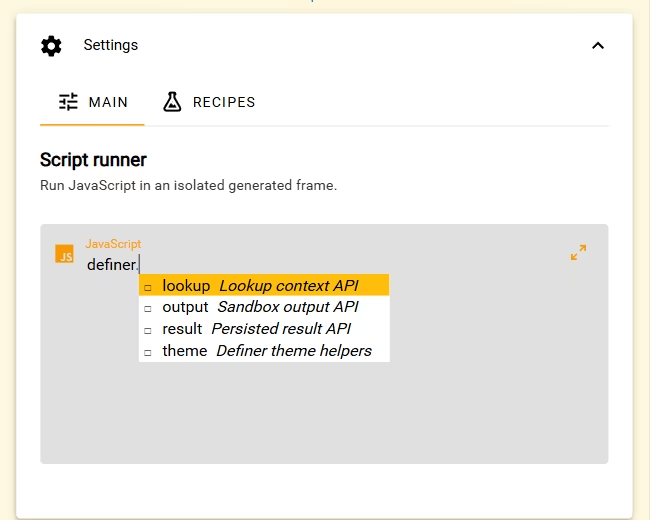
API at a glance
| Namespace | Purpose |
|---|---|
definer.actions | Copy plain text, open URLs, and replace or cut the current editable page selection. |
definer.lookup | Read the current lookup context and request another result language. |
definer.result | Read and update the plain JSON object persisted with this result. |
definer.output | Replace the result body's HTML or the helper-managed CSS. |
definer.theme | Read the active theme and create Definer CSS-variable references. |
Use definer.actions for the supported clipboard, URL, and selection operations. The API does not give your code direct access to browser extension APIs or Definer's global settings.
Lookup
definer.lookup.query
Type: string (read-only)
The current lookup text. This is the same query represented by the surrounding lookup session.
definer.lookup.language
Type: string (read-only)
The language of this Script result. Calling activateLanguage() does not mutate this value in place: an accepted language change causes Definer to activate that language and recreate the result frame.
definer.lookup.source
Type: { id, type, index?, options } | null (read-only cloned value)
A copy of the current Source information available to the Script. options.code is omitted. Changing the returned object does not change the Source.
definer.lookup.getVariable(name)
Signature: getVariable(name: string): any
Returns an isolated snapshot of one lookup variable. Objects and arrays are cloned; changing the returned value does not change the lookup. An unknown or unavailable name returns undefined.
Use literal names whenever possible so the value remains available when you reopen a saved lookup:
const pageText = definer.lookup.getVariable('page_text')
const context = {
	query: definer.lookup.query,
	language: definer.lookup.language,
	url: definer.lookup.getVariable('url') ?? null,
	pageTitle: definer.lookup.getVariable('page_title') ?? null,
	sentence: definer.lookup.getVariable('sentence') ?? null,
	paragraph: definer.lookup.getVariable('paragraph') ?? null,
	pageTextPreview:
		typeof pageText === 'string' ? pageText.slice(0, 500) : null,
}

definer.output.setHtml(`
	<section class="context-inspector">
		<h1>Lookup context</h1>
		<pre></pre>
	</section>
`)
definer.output.setCss(`
	.context-inspector { padding: 16px; }
	.context-inspector h1 { margin-top: 0; }
	.context-inspector pre {
		padding: 12px;
		overflow: auto;
		white-space: pre-wrap;
		border-radius: 8px;
		background: ${definer.theme.rgba('text', 0.06)};
	}
`)

document.querySelector('.context-inspector pre').textContent = JSON.stringify(
	context,
	null,
	2,
)
The Lookup variable reference lists every name, type, and example. See Use Lookup variables in Script for literal and computed name rules.
definer.lookup.activateLanguage(language)
Signature: activateLanguage(language: string): void
Asks the surrounding lookup to activate an available result language. The code must be non-empty and already present in the lookup's language picker.
The current run keeps its old definer.lookup.language. When Definer accepts the change, it activates the language and reruns the Script result. An empty or unavailable code is shown as a Script error.
See the tested Multilingual Wikipedia Summary for a complete example that uses the configured result languages for a real data source.
Actions
Use actions to add buttons that copy a result, open a link, or edit selected text on the page. Every action returns a promise. Use await to confirm completion, and catch errors to show a message in your result.
Call copyText(), openUrl(), replaceText(), and cut() from a button click or key press inside your Script result. They require a recent interaction and cannot run automatically when the script starts. Long waits, such as waiting for a network response, can make that interaction expire. Prepare the text first, then let the reader select a button to apply it.
getSelection() does not require a click or key press.
definer.actions.getSelection()
Signature: getSelection(): Promise<{ text: string; editable: boolean }>
Reads the current page selection for a live Bubble lookup. If you select different text while the Bubble is pinned, this method returns that text. Clicking a button inside the Bubble preserves the page selection so the button can act on it.
textis the selected text, including its original whitespace.editableindicates whether that selection belongs to a supported editable field. The field can still reject a particular replacement.
The promise rejects if no live page selection is available or the selected field's content has changed. See Live selection requirements.
Read getSelection() in your button's click handler when a conversion should use the text selected at that moment. definer.lookup.query remains the text used for the lookup; selecting something else does not change it until you start another lookup.
definer.actions.copyText(text)
Signature: copyText(text: string): Promise<void>
Copies the supplied plain text to the clipboard. You can copy the lookup query, a formatted result, or any other string your script prepares. This does not require an editable page selection and does not remove text from the page.
The text must be a string of at most 1,000,000 UTF-16 code units, the length reported by JavaScript's text.length. Rich HTML is not copied. Copy does not request an additional clipboard permission.
definer.actions.openUrl(url, options?)
Signature: openUrl(url: string, options?: { active?: boolean }): Promise<void>
Opens an absolute HTTP or HTTPS URL in a new browser tab. active defaults to true; pass { active: false } to request a background tab.
The browser extension also accepts mailto: and tel: URLs; their handling depends on your browser. URLs are limited to 16,384 UTF-16 code units (url.length). Relative URLs and schemes such as javascript:, data:, and file: are rejected.
In Definer Desktop, HTTP and HTTPS links open in your system browser. URLs containing a username or password, mailto: URLs, and tel: URLs are not supported there, and active does not control the system browser's focus.
Live selection requirements
Start with a Bubble lookup opened from selected page text. Replace and Cut then use the current page selection, including a different selection made while the Bubble is pinned. Clearing the selection leaves nothing to edit; the actions do not restore an older selection.
They support ordinary editable text inputs, textareas, and webpage text marked as editable. Read-only, disabled, and password fields cannot be edited. Some custom editors or text inside embedded pages may not provide a usable selection. Text in other desktop applications cannot be edited through this API.
Preview, typed lookups, and results reopened from History have no live page selection to edit. Copy and URL opening remain available from a click or key press.
If the field closes or its content changes, select the text you want to edit again. Do the same after a successful Replace or Cut, including after using Undo. You can keep using the same live Bubble without starting another lookup.
definer.actions.replaceText(text)
Signature: replaceText(text: string): Promise<void>
Replaces the current editable page selection with the supplied plain text. An empty string removes the selection. HTML is inserted as text, not interpreted as markup.
The string limit is the same as for copyText(). A field's own maximum length still applies. Single-line inputs reject line breaks; textareas accept them and use LF line endings. Definer rejects an oversized or multiline replacement before changing a field that cannot accept it.
The selected field must be available for editing, and its editing rules can reject the change. Successful edits support the editor's usual Undo action.
definer.actions.cut()
Signature: cut(): Promise<void>
Copies the current editable page selection to the clipboard, then removes it from the field. The removal supports Undo, and the live selection requirements apply.
If copying fails, the text is not removed. If the selection changes while Cut is running, removal stops so it cannot delete text it did not copy. If copying succeeds but removal fails, the copied text remains on the clipboard even though Cut reports an error.
Clipboard reading and paste
There is no definer.actions.paste() or clipboard-reading method. Use copyText() for text your script already has, or use replaceText() to insert that text into the current editable page selection. For text already on the clipboard, use your normal Paste action in the field.
Action errors
Action errors supplied by Definer have code and message properties. Show error.message to explain the failure, or use error.code to offer a suitable next action. These codes describe the supported failures:
| Code | Meaning and recovery |
|---|---|
gestureRequired | Run the action from a fresh button click or key press. |
invalidRequest | Check argument types, text and URL lengths, and the accepted URL schemes. |
selectionUnavailable | Select text on the page. If the result came from Preview, History, or a typed lookup, start a Bubble lookup from selected page text first. |
selectionChanged | The selection changed during the action, its content changed, or it was already edited. Select the intended text again and retry. |
notEditable | Select text in a supported editable field to use Replace or Cut. |
editRejected | The field could not be selected for editing, rejected the change, or does not accept its length or line breaks. Check the field and try a suitable replacement. |
clipboardUnavailable | Copying failed. Try Copy again from a fresh interaction. |
disposed | The Script result closed. Reopen it; select text again if you need to edit the page. |
timeout | The action did not finish in time. Check the result before retrying, since a late action may still complete. |
busy | Another edit is running or too many actions are pending. Wait before trying again. |
failed | The action failed for another reason. Read the error message. |
Result data
Result data is the only Script-owned state that survives the document. It belongs to the specific source and result language in that lookup; it is not a global settings store.
definer.result.getData()
Signature: getData(): Record<string, any>
Returns an isolated clone of the current result data. Mutating the returned object has no effect until it is passed to setData() or patchData().
Within one run, getData() immediately reflects successful setData() and patchData() calls.
definer.result.setData(data)
Signature: setData(data: Record<string, any>): void
Replaces the entire data object. The new value is available immediately to getData(). Invalid input throws a TypeError, so the Script can catch and handle it; otherwise Definer shows the error in the result.
definer.result.patchData(data)
Signature: patchData(data: Record<string, any>): void
Shallow-merges the supplied object's top-level properties into the current data object. Nested objects are replaced, not recursively merged. Validation happens before the merge, and invalid input throws a synchronous TypeError.
Accepted Values
The root must be a plain object and every nested value must be representable as strict JSON:
- accepted: strings, booleans, finite numbers,
null, arrays, plain objects, and objects such asDatethat deliberately serialize to valid JSON; - rejected:
undefined, functions, symbols,BigInt,NaN, infinities, circular references, and non-object roots.
Other object types follow their ordinary JSON behavior. For example, Date becomes a string, while many runtime objects serialize to {} or lose most of their information. Do not store DOM nodes, maps, sets, errors, class instances, or similar runtime objects: they do not round-trip meaningfully.
Definer clones data during every read and write. Keep only the values the result needs, and use the normal error handling above for data that does not meet the JSON rules.
The Lookup Notes example demonstrates the full restore-render-update cycle with useful per-result data:
const saved = definer.result.getData()

definer.output.setHtml(`
	<section class="lookup-notes">
		<label for="lookup-note">Notes for this lookup</label>
		<textarea id="lookup-note" rows="6" placeholder="Add a mnemonic, example, or reminder…"></textarea>
		<div>
			<button type="button">Save note</button>
			<span role="status"></span>
		</div>
	</section>
`)
definer.output.setCss(`
	.lookup-notes { display: grid; gap: 10px; padding: 18px; }
	.lookup-notes label { font-weight: 600; }
	.lookup-notes textarea {
		width: 100%; padding: 10px; resize: vertical; color: inherit;
		border: 1px solid ${definer.theme.rgba('text', 0.2)};
		border-radius: 8px; background: ${definer.theme.rgba('text', 0.04)};
	}
	.lookup-notes div { display: flex; align-items: center; gap: 10px; }
	.lookup-notes button { padding: 7px 12px; cursor: pointer; }
	.lookup-notes [role="status"] { opacity: 0.7; }
`)

const note = document.querySelector('.lookup-notes textarea')
const status = document.querySelector('.lookup-notes [role="status"]')
note.value = typeof saved.note === 'string' ? saved.note : ''

document.querySelector('.lookup-notes button').addEventListener('click', () => {
	definer.result.patchData({
		note: note.value,
		updatedAt: new Date().toISOString(),
	})
	status.textContent = 'Saved with this lookup.'
})
Output
Output helpers are optional. The sandbox document's normal document and DOM APIs remain available.
definer.output.setHtml(html)
Signature: setHtml(html: string): void
Replaces document.body.innerHTML. A later call replaces the previous body contents, including nodes and listeners attached to those nodes.
setHtml() performs no sanitization. Treat queries, lookup variables, fetched content, and saved data as untrusted. Prefer creating elements and assigning dynamic values through textContent; use innerHTML only for markup you trust or have sanitized yourself.
definer.output.setCss(css)
Signature: setCss(css: string): void
Replaces the contents of one style element managed by the Script runtime. A later call replaces the earlier helper-managed CSS. Styles inserted independently through the DOM remain your responsibility.
Direct DOM access
You may use document.createElement(), selectors, events, form controls, canvas, and other DOM APIs directly. The result document remains under your control while it is open. Normal form submission is not available.
Default document styles
Before user CSS, Definer applies a small theme-aware baseline: light/dark color-scheme, the ground page background, zero body margin, theme text/font properties, border-box sizing, and the anchor color for links. setCss() can override these defaults for the result, while the active theme variables remain available on the document root.
Theme
Definer applies the active theme's CSS variables to the Script document and supplies helpers for referring to them.
Properties
| Property | Type | Meaning |
|---|---|---|
definer.theme.id | string | null | Current theme identifier. |
definer.theme.variables | Record<string, string> | Isolated snapshot of all supplied CSS variables, keyed by names such as --v-text-base. |
Methods
| Method | Returns | Behavior |
|---|---|---|
get(name: string) | string | Resolves an exact CSS-variable name or a short color name such as text; returns '' when missing. |
cssVar(name: string, fallback?: string) | string | Creates var(--v-<name>-base) or a reference to an exact --... name. |
rgba(name: string, alpha?: number) | string | Creates an rgba(var(--<name>-rgb), alpha) reference; the default is 1 and alpha is clamped to 0–1. |
mix(name: string, amount?: number, other?: string) | string | Creates a color-mix() expression; defaults are 80 and text, and amount is clamped to 0–100. |
apply(element?: HTMLElement, variables?: Record<string, string>) | void | Applies valid --... variables inline. Defaults to the document root and the current theme snapshot. |
Short color names map to Definer variables. For example, text maps to --v-text-base, primary maps to --v-primary-base, and primary.lighten1 maps to --v-primary-lighten1. Passing an exact name beginning with -- leaves that name intact.
Standard Definer color names are primary, secondary, accent, ground, text, ptext, contrast, anchor, error, warning, info, and success. A theme can expose additional variables; inspect definer.theme.variables when integrating a custom one.
Theme updates are applied to the live document without rerunning the script. CSS created with cssVar(), rgba(), or mix() continues to follow the updated variables. A raw value returned by get() and copied elsewhere is a snapshot.
apply() also writes snapshot values inline. Calling it with no arguments copies the entire current theme onto document.documentElement; those inline declarations can override later values applied by Definer's live theme style block. Prefer CSS references for live theming, or use apply(element, variables) only for deliberate custom inline variables.
The Page Citation and other catalog scripts use theme helpers in useful result interfaces. For example, Page Citation uses rgba() to derive a subtle theme-aware surface:
const title = definer.lookup.getVariable('page_title') || 'Untitled page'
const url = definer.lookup.getVariable('url') || 'URL unavailable'
const site = definer.lookup.getVariable('page_og_site_name')
const modified = definer.lookup.getVariable('page_last_modified')
const accessed = new Intl.DateTimeFormat('en', { dateStyle: 'medium' }).format(new Date())
const source = site ? `${title}. ${site}.` : `${title}.`
const detail = modified ? `Last modified ${modified}.` : `Accessed ${accessed}.`
const formats = {
	plain: `${source} ${detail} ${url}`,
	markdown: `[${title.replaceAll('[', '\\[').replaceAll(']', '\\]')}](${url})`,
}

definer.output.setHtml(`
	<section class="citation-builder">
		<div>
			<button type="button" data-format="plain">Plain text</button>
			<button type="button" data-format="markdown">Markdown</button>
		</div>
		<pre></pre>
	</section>
`)
definer.output.setCss(`
	.citation-builder { padding: 18px; }
	.citation-builder div { display: flex; gap: 8px; }
	.citation-builder button { padding: 7px 12px; cursor: pointer; }
	.citation-builder pre {
		padding: 12px; white-space: pre-wrap; user-select: text;
		border-radius: 8px; background: ${definer.theme.rgba('text', 0.06)};
	}
`)

const output = document.querySelector('.citation-builder pre')
const showFormat = (format) => {
	output.textContent = formats[format]
}

for (const button of document.querySelectorAll('.citation-builder button')) {
	button.addEventListener('click', () => showFormat(button.dataset.format))
}

showFormat('plain')
Standard browser APIs
The isolated document supports ordinary APIs provided by the current browser, including:
window,document, DOM events, form controls, canvas, and media elements;- promises, top-level
await, timers,queueMicrotask, andrequestAnimationFrame; URL,TextEncoder,TextDecoder,ReadableStream,AbortController, and other web-platform primitives;- Script Fetch for HTTP and HTTPS requests.
Availability still follows normal browser and sandbox rules. Feature-detect optional APIs when a script depends on them.
Error behavior
Syntax errors, exceptions, rejected top-level execution, uncaught global errors, and unhandled promise rejections are reported in the Script result. Correct the problem, then select Retry or run the lookup again.
Errors caught by your own code are yours to render or recover from. Remote-data scripts should normally show explicit loading, empty, and failure states rather than leaving the result blank.