Script runtime
A Script result is a small page created by your JavaScript. This article explains when the code runs, which changes restart it, what survives after it closes, and which browser features you can use.
When the code runs
Definer runs the code once when the Script result opens. Buttons, event listeners, timers, pending promises, and response streams continue working while that result remains open.
The code runs as a classic JavaScript function with top-level await. Top-level import and export statements are not supported.
The result restarts when you change:
- the lookup query;
- the active result language;
- the Script code; or
- the Source itself.
Closing the result stops its timers, listeners, streams, and requests. Theme changes can update the open result without rerunning the code. A later call to definer.lookup.getVariable() can also read an updated lookup variable, but a value you copied into a JavaScript variable earlier does not change automatically.
Choose what survives
HTML, CSS, JavaScript variables, and event listeners belong to the open result only. Recreate them each time the Script runs.
Use definer.result.setData() or definer.result.patchData() for JSON data that should stay with the lookup result. Read that data when the Script starts and rebuild the interface from it.
| Content | Available after the result restarts? |
|---|---|
Data saved through definer.result | Yes |
| HTML and CSS | No |
| JavaScript variables and DOM elements | No |
| Timers, listeners, streams, and pending requests | No |
localStorage, sessionStorage, and IndexedDB | No |
See Result data for the supported methods and JSON rules.
Reopen a saved Script result
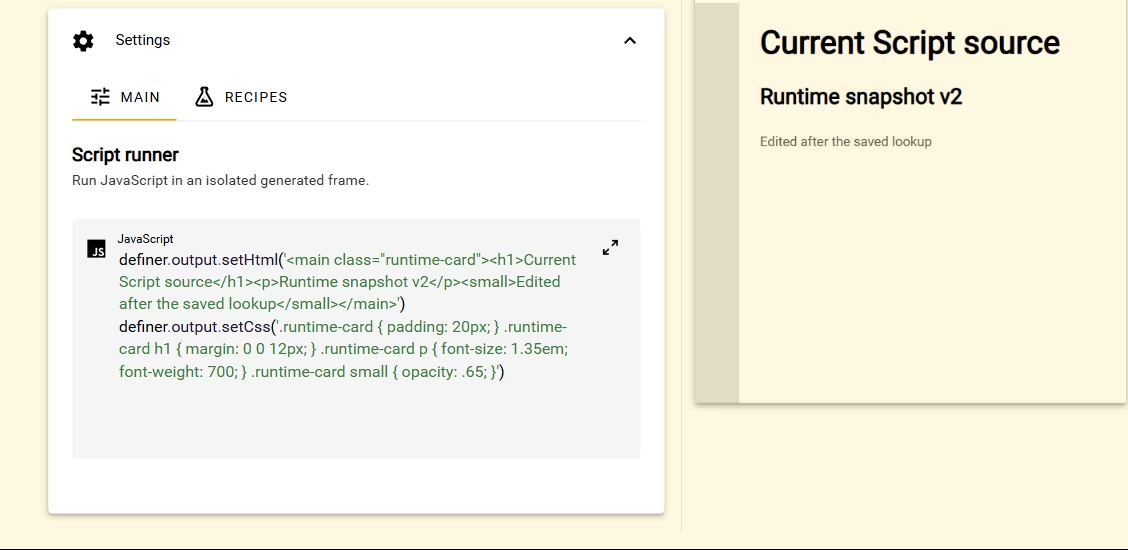
A lookup saved in History keeps the Script configuration used at that time. Editing the current Source does not rewrite an older saved result.
When you open a saved Script result, Definer asks you to reveal it before running the saved code. Data previously saved through definer.result remains available to that result.
A saved result can still offer buttons to copy text or open links. It cannot replace or cut text from the original page. Select that text again and start a fresh Bubble lookup when you need to edit it.
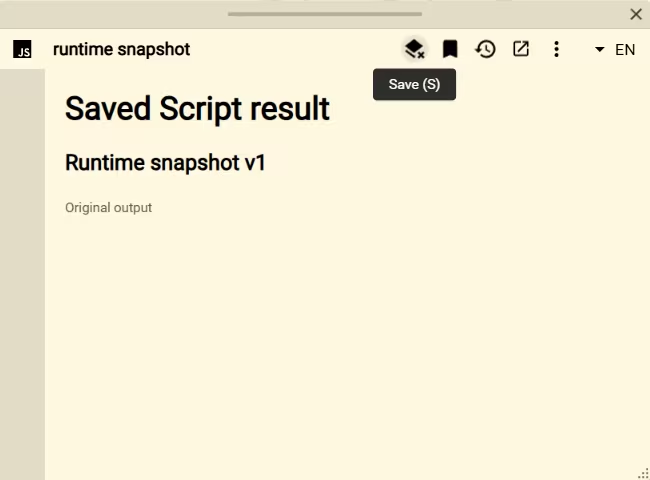
Editing the Source changes new results, but does not rewrite the saved result.
Know what a Script can access
A Script can:
- build and update its own HTML interface;
- use promises, timers, events, and animation frames;
- open modal dialogs inside its result;
- use the public
definerAPI; and - request HTTP or HTTPS resources with
fetch().
The actions API lets you copy plain text, open URLs, and replace or cut the current editable page selection. Selecting different text while the Bubble is pinned updates the selection these actions use. These operations require a recent click or key press inside the result. Reading the current page selection with getSelection() does not require an interaction.
A Script cannot directly access:
- the surrounding website's DOM or JavaScript;
- Definer's extension APIs or internal messages;
- browser extension APIs such as
chrome.*orbrowser.*; - stable browser storage such as
localStorageor IndexedDB; - popups, downloads, form navigation, or top-level page navigation; or
- remote scripts and remote stylesheets.
window.location describes the Script result, not the page where the lookup began. Use the page address Lookup variables when you need the original page URL.
Keep executable code in the Script Source itself. Use Fetch for remote data and definer.output.setCss() or an inline style for result styling.
Use definer.actions.openUrl() for URL opening rather than window.open(). Script actions do not expose the surrounding page's DOM or a clipboard-reading API. Test Replace and Cut from a live Bubble lookup; Preview has no page selection to edit.
Fix a runtime error
Definer shows errors from invalid JavaScript, rejected promises, unsupported result data, failed language changes, and other uncaught failures.
- Read the error shown over the result.
- Correct the Script or its input.
- Select Retry, use Preview, or run another lookup after correcting the Script.
If the result becomes unresponsive, close it and review loops, repeated dialogs, or other work that never yields. Test long tasks with a small representative input first.
Write safer Scripts
- Use
textContentfor lookup text, page variables, saved data, and remote text unless you deliberately create trusted HTML. - Review every endpoint before sending lookup or page data to it.
- Use
credentials: 'include'only when the request intentionally needs the reader's signed-in session. - Do not place private API keys in a Script you plan to share.
- Handle loading, empty, error, and cancellation states for remote requests.