Lookup variables
Lookup variables let supported Definer fields use details that change with each lookup. For example, a Custom source can add the lookup text or page title to its URL, Custom Audio can build an audio URL, and an AI prompt can include text around the lookup. The same values are available in supported Routine fields and the Script source.
Recipes use a different set of values for the lookup and source result, which they use to create a Collection item. See Use Liquid in Recipes when you are editing a Recipe.
Use a variable
Custom source URLs, AI prompts, and supported Routine fields use Liquid. Put a variable name between {{ and }}, such as {{ str }} for the lookup text.
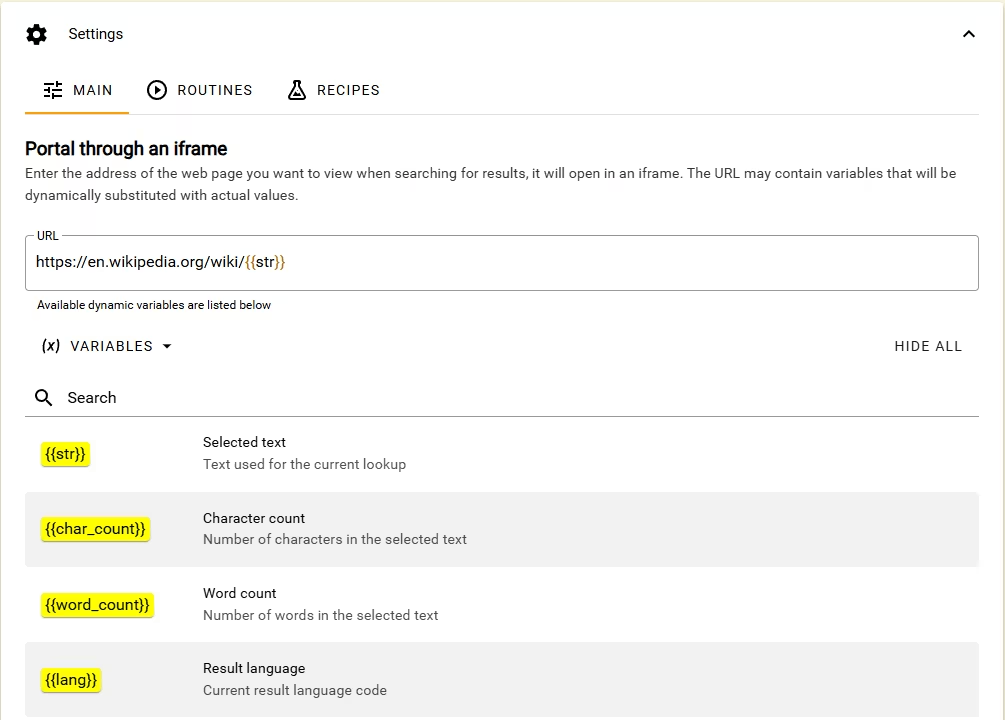
In a Custom source URL
Open Definer Options → Sources, select the Custom source you want to change, then expand Settings. Enter the following address in URL to open a Wikipedia search for the lookup text:
https://en.wikipedia.org/w/index.php?search={{ str | url_encode }}The url_encode filter makes spaces and other special characters safe inside the URL. Run a lookup for solar energy with this source and check that it opens a URL ending in search=solar%20energy.
In an AI prompt
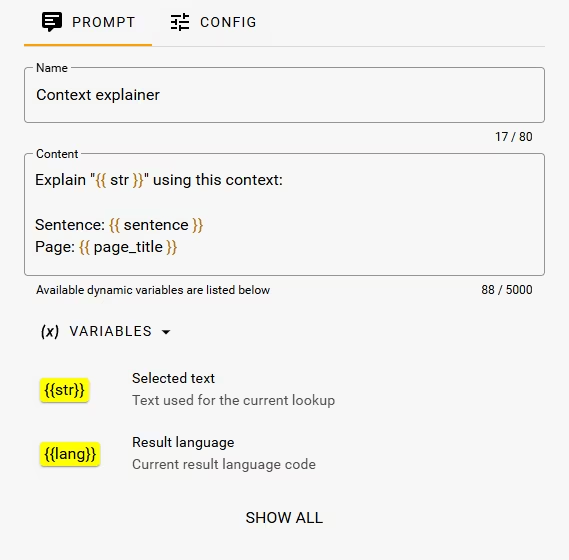
Open Definer Options → Sources, select the AI source you want to change, expand Settings, then select Prompts. Create or edit a prompt and enter this content to give the model the lookup text and an optional surrounding paragraph:
Explain "{{str}}" clearly and briefly in {{lang | language_label: "both"}}.
{{ paragraph | mark: paragraph_range | with_prefix: "Context:", newline }}
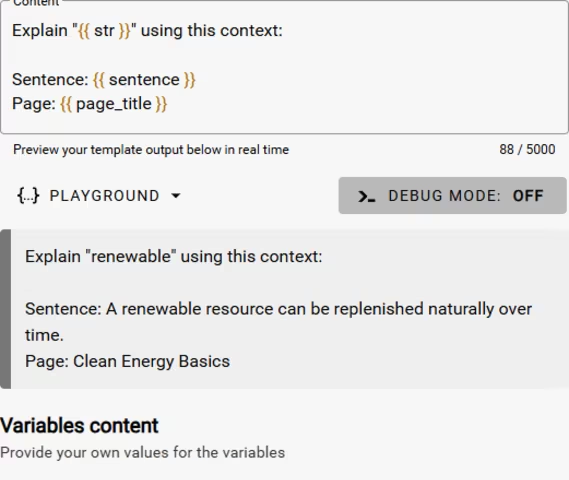
Open Playground below the prompt. Set str to "bank" and lang to "en". Select Add variable, then add paragraph with "The bank raised its fees, but she sat on the bank of the river." and paragraph_range with {"start":45,"end":49}. The preview should show literal <mark> tags around the second occurrence:
Explain "bank" clearly and briefly in English.
Context:
The bank raised its fees, but she sat on the <mark>bank</mark> of the river.
If you remove paragraph_range or enter a range outside the paragraph, the preview should contain only the first line. The mark filter returns nothing when it does not receive a valid range, and with_prefix omits the context label with it. See Liquid filters for the complete behavior and more optional-context patterns.
The screenshots below show the same prompt editor and Playground with another context template.
In a Routine
Routine Input values and Extract → Liquid Template transformations accept the same {{ variable }} form. See Routine Steps for the fields and their surrounding workflow.
In a Script source
Open Definer Options → Sources, select the Script source you want to change, then expand Settings. In the JavaScript field, select the outward-arrow Maximize control. The full editor's Variables panel shows and copies the complete definer.lookup.getVariable('name') expression for each value. See Use Lookup variables in Script for Script-specific rules.
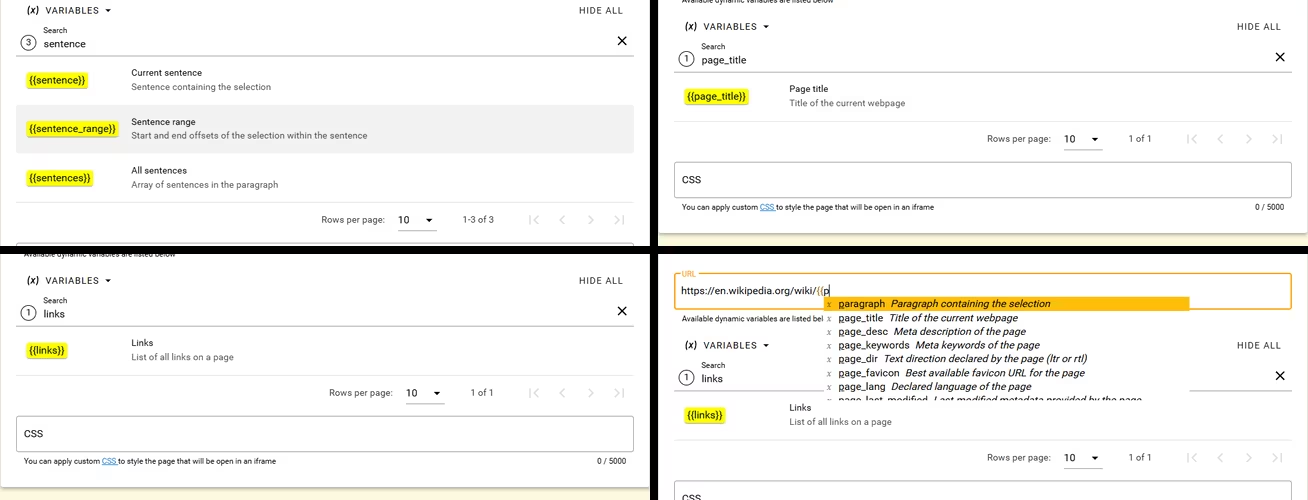
Find variables in Definer
The Variables section below a Custom URL, AI prompt, or supported Routine field starts with common values. Select Show all to search every Lookup variable and read its description.
You can also type {{ in a Liquid field to open variable suggestions. Continue typing part of a name, then choose the matching suggestion.
Choose the right language variable
Several variables describe a language, but each answers a different question:
| Variable | Use it for | Example |
|---|---|---|
lang | The language of the active lookup result. | en |
langs | All result languages available in the lookup. | ["en", "fr"] |
src_lang | The detected language of the lookup text. | jpn |
page_lang | The language declared by the website. | ja |
ui_lang | Definer's interface language. | en |
browser_locale | The browser's locale. | en-US |
Use src_lang when a prompt or URL should react to the language of the lookup text. Use lang when it should react to the result language chosen in Definer.
Work with lists and objects
Most variables contain one string, number, or true/false value. Some contain a list or an object with named properties.
Use first when you need only the first item in a list:
First section: {{ h2 | first }}Use brackets and a property name to read part of a list item or object:
First link: {{ links[0].text }} -> {{ links[0].href }}
Selection starts at: {{ sentence_range.start }}
Detected language: {{ src_lang_info.name }}
Use a loop when you want several items:
{% for heading in h2 limit: 3 %}
- {{ heading }}
{% endfor %}
The reference below uses string[] for a list of strings and object[] for a list of objects.
Lookup variable reference
The examples below show representative values. A page can produce different content, metadata, dimensions, and language results.
Lookup text and languages
| Variable | Type | What it contains | Example |
|---|---|---|---|
str | string | Text used for the lookup. | components |
char_count | number | Number of characters in str. | 10 |
word_count | number | Number of whitespace-separated words in str. | 1 |
lang | string | Active result language code. | en |
lang_info | object | Details about lang: code, base, iso6393, iso6392, name, nativeName, and any available script, region, or variants. | {"code":"en","base":"en","iso6393":"eng","iso6392":"eng","name":"English","nativeName":"English"} |
lang_name | string | English name of lang. | English |
lang_native | string | Native name of lang. | English |
langs | string[] | Result language codes available in the lookup. | ["en", "fr"] |
langs_info | object[] | One language-info object for each value in langs. | [{"code":"en","name":"English",...}] |
langs_names | string[] | English names of the available result languages. | ["English", "French"] |
langs_native | string[] | Native names of the available result languages. | ["English", "français"] |
browser_locale | string | Locale reported by the browser. | en-US |
ui_lang | string | Definer interface language code. | en |
ui_lang_info | object | Language-info object for ui_lang. | {"code":"en","name":"English",...} |
ui_lang_name | string | English name of the interface language. | English |
ui_lang_native | string | Native name of the interface language. | English |
src_lang | string | Detected lookup-text language as an ISO 639-3 code. | jpn |
src_lang_info | object | Language-info object for src_lang. | {"code":"jpn","base":"jpn","iso6393":"jpn","iso6392":"jpn","name":"Japanese","nativeName":"日本語"} |
src_lang_name | string | English name of the detected lookup-text language. | Japanese |
src_lang_confidence | number | Detection confidence from 0 to 100. | 99 |
src_lang_reliable | boolean | Whether the language detector considers its result reliable. | true |
Page address and metadata
The URL variables describe the page where the lookup began. query is the page URL's query string, not the text being looked up.
| Variable | Type | What it contains | Example |
|---|---|---|---|
url | string | Complete page URL. | https://developer.mozilla.org/en-US/docs/Web/API/Selection?view=all#Examples |
path | string | URL path. | /en-US/docs/Web/API/Selection |
origin | string | Protocol and domain, including an explicit port. | https://developer.mozilla.org |
domain | string | Page hostname. | developer.mozilla.org |
protocol | string | URL protocol, including its colon. | https: |
query | string | URL query string, including ?, or an empty string. | ?view=all |
hash | string | URL fragment, including #, or an empty string. | #Examples |
port | string | Explicit URL port, or an empty string. | 39091 |
page_title | string | Page title. | Selection - Web APIs | MDN |
page_desc | string | Page description metadata. | A Selection object represents the range of text selected by the user... |
page_keywords | string | Page keywords metadata. | Definer, Liquid, variables |
page_lang | string | Language declared by the page. | ja |
page_dir | string | Text direction declared by the page. | rtl |
page_last_modified | string | Last-modified metadata provided by the page. | Tue, 20 Aug 2024 10:00:00 GMT |
page_favicon | string | Best available page icon URL. | https://en.wikipedia.org/static/favicon/wikipedia.ico |
page_og_title | string | Open Graph title. | Open Graph protocol |
page_og_desc | string | Open Graph description. | The Open Graph protocol enables any web page to become a rich object... |
page_og_image | string | Open Graph image URL. | https://ogp.me/logo.png |
page_og_locale | string | Open Graph locale. | en_US |
page_og_site_name | string | Open Graph site name. | MDN Web Docs |
page_og_url | string | Open Graph canonical URL. | https://developer.mozilla.org/en-US/docs/Web/API/Selection |
page_og_type | string | Open Graph content type. | website |
Desktop window and application
Desktop capture lookups can include the source window's title and application name when available. These values are absent from ordinary webpage lookups.
| Variable | Type | What it contains | Example |
|---|---|---|---|
window_title | string or null | Title of the source window; can be empty or null when unavailable. | Chapter 1 - Reader |
app_name | string or null | Name of the source application, or null when unavailable. | Reader |
Lookup and surrounding text
Range objects contain start and end positions. end is the first character after the matched lookup text. A range can be null when Definer cannot place the lookup text inside the surrounding value.
| Variable | Type | What it contains | Example |
|---|---|---|---|
sentence | string | Sentence containing the lookup text. | The controlled selection appears in this sentence. |
sentence_range | object or null | Position of the lookup text inside sentence. | {"start":4,"end":24} |
sentences | string[] | Sentences found in the surrounding paragraph. | ["Earlier sentence.", "The controlled selection appears in this sentence.", "Later sentence."] |
paragraph | string | Paragraph containing the lookup text. | Earlier sentence. The controlled selection appears in this sentence. Later sentence. |
paragraph_range | object or null | Position of the lookup text inside paragraph. | {"start":22,"end":42} |
node_text | string | Text in the page text node that contains the selection. | to render lists of components. |
node_parent_text | string | Text in that node's parent page element. | You will rely on JavaScript features ... to render lists of components. |
node_ancestors | object[] | Up to 10 containing page elements with tagName, id, classes, attributes, and innerText. | [{"tagName":"p","id":"intro","classes":["summary"],...}] |
text_before | string | Page text before the selection. | ...Earlier sentence. The |
text_after | string | Page text after the selection. | appears in this sentence. Later sentence... |
lines_selected | string[] | Text lines touched by the selection. | ["chosen words"] |
lines_above | string[] | Up to 25 lines above the selection. | ["Alpha line.", "Second line contains "] |
lines_below | string[] | Up to 25 lines below the selection. | [".", "Third line.", "Fourth line."] |
Page content and structure
Link and image addresses are returned as written by the page. They can be complete URLs or relative paths such as /docs. A missing href, src, or alt value is null.
| Variable | Type | What it contains | Example |
|---|---|---|---|
page_text | string | Visible text collected from the page body. | Learn React\nQuick Start\nCreating and nesting components... |
h1, h2, h3, h4, h5, h6 | string[] | Text from headings at the corresponding level. | h2: ["Quick Start", "Displaying data"] |
links | object[] | Page links with text (string) and href (string or null). | [{"text":"Examples","href":"#examples"}] |
images | object[] | Page images with src and alt (string or null). | [{"src":"/logo.svg","alt":"MDN"}] |
quotes | string[] | Text from block quotes. | ["Quoted controlled text."] |
code_blocks | string[] | Text from preformatted code blocks. | ["const controlled = true"] |
table_of_contents | object[] | Flat heading list with text, id, and level. | [{"text":"Examples","id":"examples","level":2}] |
document_outline | object[] | Nested heading tree with level, text, id, and children. | [{"level":1,"text":"Introduction","id":"intro","children":[...]}] |
page_text describes visible page text, not values entered into form fields.
Date, time, and generated values
Date and time values describe the local date and time when the lookup begins. datetime_iso is expressed in UTC. Each random value is generated once for the lookup, so repeated uses of the same variable return the same value.
| Variable | Type | What it contains | Example |
|---|---|---|---|
datetime_iso | string | Date and time in ISO 8601 format. | 2026-08-22T11:08:27.745Z |
date | string | Local date in YYYY-MM-DD format. | 2026-08-22 |
time | string | Locale-formatted local time. | 2:08:27 PM |
timestamp | number | Milliseconds since the Unix epoch. | 1787396907745 |
timezone | number | Local-to-UTC offset in minutes. Negative values are ahead of UTC. | -180 |
weekday | number | Day of the week from 0 (Sunday) to 6 (Saturday). | 6 |
month | number | Month from 0 (January) to 11 (December). | 7 |
year | number | Full local year. | 2026 |
day | number | Local day of the month. | 22 |
hour | number | Local hour from 0 to 23. | 14 |
minute | number | Local minute. | 8 |
second | number | Local second. | 27 |
millisecond | number | Local millisecond. | 745 |
random_number | number | Random integer from 0 to 999. | 153 |
random_string | string | Short generated base-36 text. | 5r1769 |
Viewport
Viewport values describe the page when the lookup begins. They do not update as you continue scrolling or resize the page.
| Variable | Type | What it contains | Example |
|---|---|---|---|
scroll_px | number | Vertical scroll position in pixels. | 5156 |
scroll_percent | number | Approximate vertical scroll percentage. | 40 |
window_width | number | Page viewport width in pixels. | 1440 |
window_height | number | Page viewport height in pixels. | 960 |
When a value is empty
A website might not provide description, Open Graph, direction, last-modified, or other metadata. A page without matching headings, links, images, quotes, or code blocks produces an empty list for that category.
Surrounding-text values can also be empty when a lookup was typed instead of started from page text, or when the page does not expose suitable surrounding content. In Liquid, an unavailable value normally produces no text. In Script, getVariable() returns undefined, so your code can provide a fallback.