Fetch web data
Use fetch() when a Script result needs data from an HTTP API or another website. Script supports the familiar Fetch interface, including JSON, text, binary responses, streams, request bodies, headers, and cancellation.
Use an absolute http:// or https:// address. A relative address points to the Script result itself, not to the page where the lookup began.
Fetch JSON
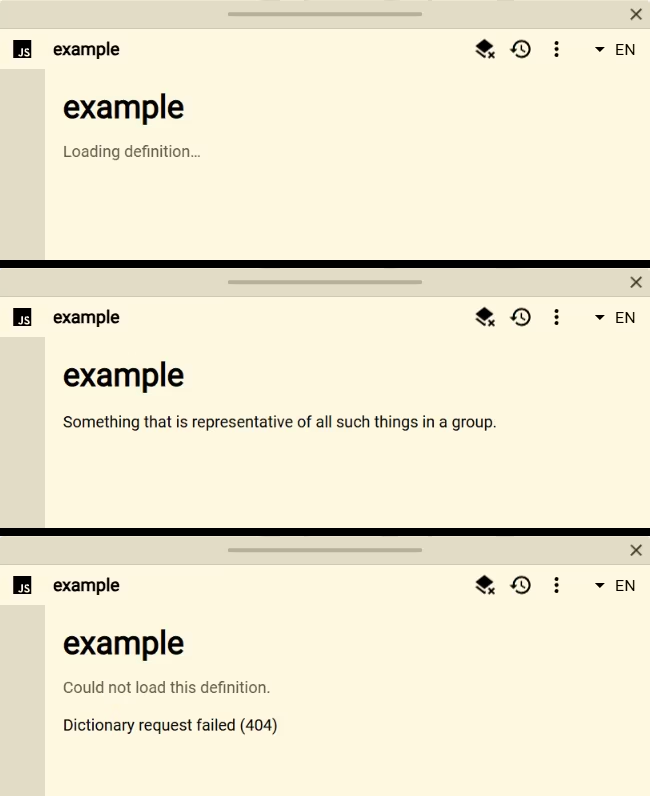
This catalog example looks up the current query in a dictionary API, shows one definition, and saves the returned data with the result:
const query = definer.lookup.query.trim()
const saved = definer.result.getData()

definer.output.setHtml(`
	<article class="dictionary-result">
		<h1></h1>
		<p class="dictionary-result__status">Loading definition…</p>
		<p class="dictionary-result__definition"></p>
	</article>
`)
definer.output.setCss(`
	.dictionary-result { padding: 18px; }
	.dictionary-result h1 { margin: 0 0 8px; }
	.dictionary-result__status { opacity: 0.65; }
	.dictionary-result__definition { line-height: 1.55; }
`)

const heading = document.querySelector('.dictionary-result h1')
const status = document.querySelector('.dictionary-result__status')
const definition = document.querySelector('.dictionary-result__definition')
heading.textContent = query

try {
	const loadedFromSaved = saved.query === query && Array.isArray(saved.entries)
	let entries = loadedFromSaved ? saved.entries : null
	if (!Array.isArray(entries)) {
		const endpoint =
			`https://api.dictionaryapi.dev/api/v2/entries/en/` +
			encodeURIComponent(query)
		const response = await fetch(endpoint)
		if (!response.ok) {
			throw new Error(`Dictionary request failed (${response.status})`)
		}

		entries = await response.json()
		definer.result.setData({ query, entries })
	}

	const firstDefinition = entries?.[0]?.meanings?.[0]?.definitions?.[0]?.definition
	status.textContent = loadedFromSaved ? 'Loaded from saved data' : ''
	definition.textContent = firstDefinition ?? 'No definition was returned.'
} catch (error) {
	status.textContent = 'Could not load this definition.'
	definition.textContent =
		error instanceof Error ? error.message : String(error)
}
The important pattern is:
- show a loading state;
- call
fetch()with the complete address; - check
response.okorresponse.status; - read the response with
json(),text(),arrayBuffer(),blob(), orresponse.body; and - show a useful empty or error state when the request does not produce usable data.
Send request data
fetch(input, init) accepts standard methods, headers, bodies, credentials, redirects, and AbortSignal cancellation. For JSON, serialize the value and set its content type:
const response = await fetch('https://example.com/api', {
	method: 'POST',
	headers: { 'Content-Type': 'application/json' },
	body: JSON.stringify({ query: definer.lookup.query }),
})

if (!response.ok) {
	throw new Error(`Request failed with ${response.status}`)
}
You can also use strings, URLSearchParams, FormData, blobs, array buffers, typed arrays, and supported readable streams as request bodies.
Definer can read HTTP responses that do not include browser CORS permission. This does not bypass the remote service's authentication, rate limits, or other access rules, and your browser may still ask for permission to access a site.
Use credentials carefully
Cross-site cookies are not sent by default. Add credentials: 'include' only when the request intentionally needs the reader's signed-in browser session.
Do not publish private API keys in a catalog Script or shared Source. Keep secrets out of code you plan to export or share.
Read a streaming response
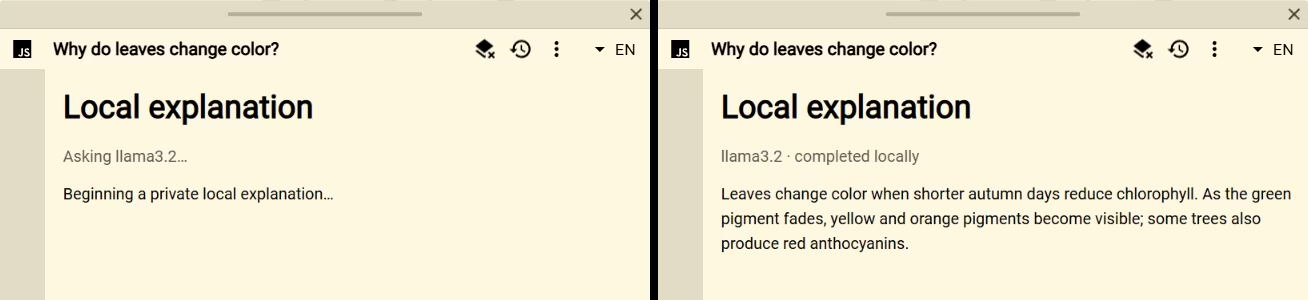
response.body is a ReadableStream. The Ollama Explainer example reads newline-delimited JSON and displays the answer as it arrives:
const query = definer.lookup.query.trim()
const model = 'llama3.2'
const saved = definer.result.getData()

definer.output.setHtml(`
	<article class="ollama-result">
		<h1>Local explanation</h1>
		<p class="ollama-result__status">Asking ${model}…</p>
		<div class="ollama-result__answer"></div>
	</article>
`)
definer.output.setCss(`
	.ollama-result { padding: 18px; }
	.ollama-result h1 { margin-top: 0; }
	.ollama-result__status { opacity: 0.65; }
	.ollama-result__answer { line-height: 1.55; white-space: pre-wrap; }
`)

const status = document.querySelector('.ollama-result__status')
const output = document.querySelector('.ollama-result__answer')

try {
	if (saved.query === query && saved.model === model && typeof saved.answer === 'string') {
		status.textContent = 'Loaded from saved data'
		output.textContent = saved.answer
	} else {
		const response = await fetch('http://localhost:11434/api/generate', {
			method: 'POST',
			headers: { 'Content-Type': 'application/json' },
			body: JSON.stringify({
				model,
				prompt: `Explain “${query}” clearly and concisely.`,
				stream: true,
			}),
		})
		if (!response.ok) throw new Error(`Ollama request failed (${response.status})`)
		if (!response.body) throw new Error('Ollama returned no readable body')

		const reader = response.body.getReader()
		const decoder = new TextDecoder()
		let buffer = ''
		let answer = ''
		const consumeLine = (line) => {
			if (!line.trim()) return
			const message = JSON.parse(line)
			if (message.error) throw new Error(message.error)
			if (typeof message.response === 'string') answer += message.response
			output.textContent = answer
		}

		while (true) {
			const chunk = await reader.read()
			if (chunk.done) break
			buffer += decoder.decode(chunk.value, { stream: true })
			const lines = buffer.split('\n')
			buffer = lines.pop() || ''
			for (const line of lines) consumeLine(line)
		}

		buffer += decoder.decode()
		consumeLine(buffer)
		status.textContent = answer ? '' : 'Ollama returned an empty response.'
		if (answer) definer.result.setData({ query, model, answer })
	}
} catch (error) {
	status.textContent = 'Could not reach the local Ollama server.'
	output.textContent = error instanceof Error ? error.message : String(error)
}
A chunk is not guaranteed to contain one complete line or JSON value. Keep incomplete text until the response format tells you that a complete record has arrived.
Cancel a request
Pass an AbortSignal just as you would with normal Fetch:
const controller = new AbortController()
await fetch('https://example.com/slow', {
	signal: controller.signal,
})

controller.abort()
Closing or restarting the Script result also cancels its active requests. Script requests cannot continue as background downloads, and keepalive: true is not supported.
Know the supported boundary
Use fetch() for HTTP and HTTPS. XMLHttpRequest, WebSocket, EventSource, sendBeacon, form submission, and navigation do not receive the same cross-site access.
An HTTP error such as 404 or 500 still returns a Response, so check its status. Connection failures and cancellations reject the Fetch promise. Catch those failures inside the Script when you want a result-specific recovery message instead of Definer's general Script error.