Ollama Explainer
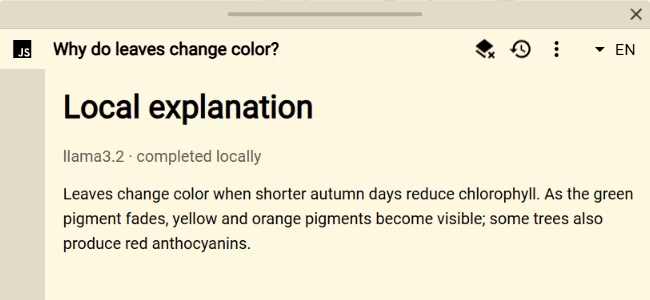
Ollama Explainer asks a model running on your own computer to explain the lookup text, then displays the answer as it is generated. It is a practical starting point for local AI sources that do not send lookups to a hosted provider.
Requirements
- Ollama must be installed and running on its default local endpoint,
http://localhost:11434. - The
llama3.2model used by the script must already be available locally, or themodelconstant must be changed to one you have installed.
Setup
- Confirm Ollama can generate a response with the chosen model.
- Add or open a Script source in Definer Options.
- Replace the code in its editor with the script below.
- Run a lookup.
Script
const query = definer.lookup.query.trim()
const model = 'llama3.2'
const saved = definer.result.getData()

definer.output.setHtml(`
	<article class="ollama-result">
		<h1>Local explanation</h1>
		<p class="ollama-result__status">Asking ${model}…</p>
		<div class="ollama-result__answer"></div>
	</article>
`)
definer.output.setCss(`
	.ollama-result { padding: 18px; }
	.ollama-result h1 { margin-top: 0; }
	.ollama-result__status { opacity: 0.65; }
	.ollama-result__answer { line-height: 1.55; white-space: pre-wrap; }
`)

const status = document.querySelector('.ollama-result__status')
const output = document.querySelector('.ollama-result__answer')

try {
	if (saved.query === query && saved.model === model && typeof saved.answer === 'string') {
		status.textContent = 'Loaded from saved data'
		output.textContent = saved.answer
	} else {
		const response = await fetch('http://localhost:11434/api/generate', {
			method: 'POST',
			headers: { 'Content-Type': 'application/json' },
			body: JSON.stringify({
				model,
				prompt: `Explain “${query}” clearly and concisely.`,
				stream: true,
			}),
		})
		if (!response.ok) throw new Error(`Ollama request failed (${response.status})`)
		if (!response.body) throw new Error('Ollama returned no readable body')

		const reader = response.body.getReader()
		const decoder = new TextDecoder()
		let buffer = ''
		let answer = ''
		const consumeLine = (line) => {
			if (!line.trim()) return
			const message = JSON.parse(line)
			if (message.error) throw new Error(message.error)
			if (typeof message.response === 'string') answer += message.response
			output.textContent = answer
		}

		while (true) {
			const chunk = await reader.read()
			if (chunk.done) break
			buffer += decoder.decode(chunk.value, { stream: true })
			const lines = buffer.split('\n')
			buffer = lines.pop() || ''
			for (const line of lines) consumeLine(line)
		}

		buffer += decoder.decode()
		consumeLine(buffer)
		status.textContent = answer ? '' : 'Ollama returned an empty response.'
		if (answer) definer.result.setData({ query, model, answer })
	}
} catch (error) {
	status.textContent = 'Could not reach the local Ollama server.'
	output.textContent = error instanceof Error ? error.message : String(error)
}
How it works
The script sends a JSON POST request to Ollama's generate endpoint with streaming enabled. It incrementally decodes the newline-delimited JSON response, keeps incomplete lines between chunks, and appends each response fragment with textContent.
The final answer is saved with the query and model. Reopening that result restores the answer without running the model again. A different lookup, result language, or edited Source creates a separate result.
Customize it
- Change
modelto a model installed on your machine. - Replace the prompt with a dictionary, code-review, summarization, or study workflow.
- Include explicitly requested lookup variables when the model needs surrounding context.
- Store structured fields instead of one answer when later interactions need them.
Limitations
Available models, response quality, and context limits depend on the local Ollama installation. Closing or restarting the result stops the request.
Return to the Script Catalog.