Use lookup variables in Script
The Script source can read the same Lookup variables used by supported fields in other Definer sources and Routines. Use them when your result needs the selected sentence, page title, detected language, headings, links, or another detail from the lookup.
Open Definer Options → Sources, select the Script source you want to change, then expand Settings. In the JavaScript field, select the outward-arrow Maximize control. The full editor's Variables panel lets you search every available name and copy its complete Script expression.
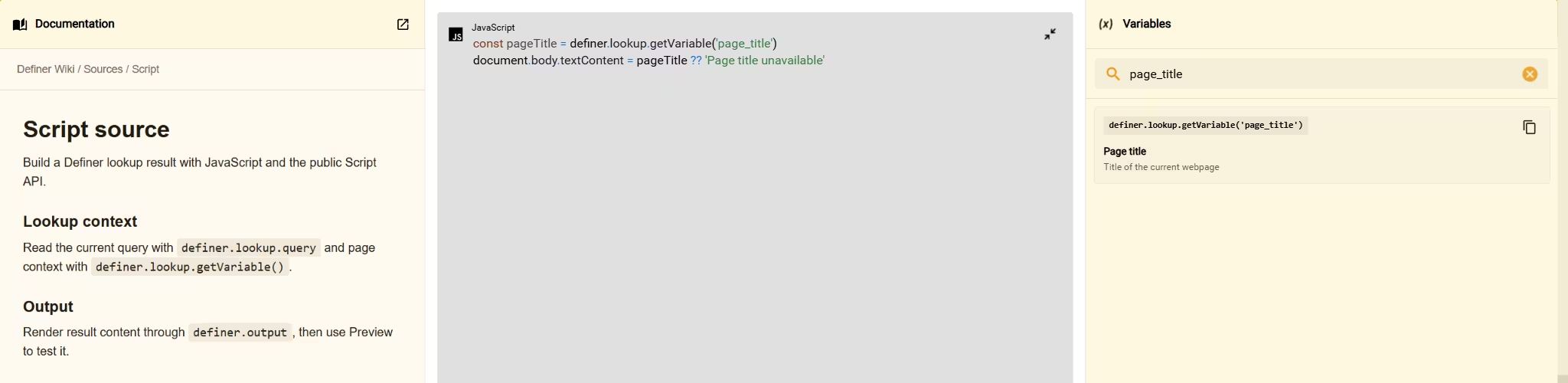
Read a value
Read one variable by its literal name:
const pageTitle = definer.lookup.getVariable('page_title')
document.body.textContent = pageTitle ?? 'Page title unavailable'
This example displays the page title or Page title unavailable when the lookup does not contain one. See the complete Lookup variable reference for names, types, and examples.
NOTE
In a Routine Script Step, definer.lookup.getVariable('name') is the only Definer lookup method available. Other Script source methods do not apply to Routine Steps.
Use literal names
Prefer a string literal directly in each getVariable() call, as the example above does.
Using literal names keeps those values available when you reopen a saved lookup. A variable that was unavailable in the original lookup still returns undefined, so handle missing values in your code.
Computed variable names
If your code chooses a variable name dynamically, include one literal access for every possible name, then perform the dynamic read:
const availableContext = {
	sentence: definer.lookup.getVariable('sentence'),
	paragraph: definer.lookup.getVariable('paragraph'),
}

const variableName = definer.lookup.query.includes('paragraph')
	? 'paragraph'
	: 'sentence'
const value = definer.lookup.getVariable(variableName)

const output = document.createElement('pre')
output.textContent = JSON.stringify(
	{ variableName, value, availableContext },
	null,
	2,
)
document.body.append(output)
The literal reads can also build a fallback object, as this example does.
Handle unavailable values
An unknown or unavailable variable returns undefined. Empty page metadata can return an empty string, and page categories such as headings or links can return an empty array. Range variables can return null.
Use a fallback when the result must display something. The first example on this page uses Page title unavailable when page_title is missing.
The Context Inspector shows representative values from a lookup when you want to explore several variables together.