Context Inspector
Context Inspector displays the query, result language, and a focused selection of page-context values. It is useful while developing a source that behaves differently according to where and how a lookup was started.
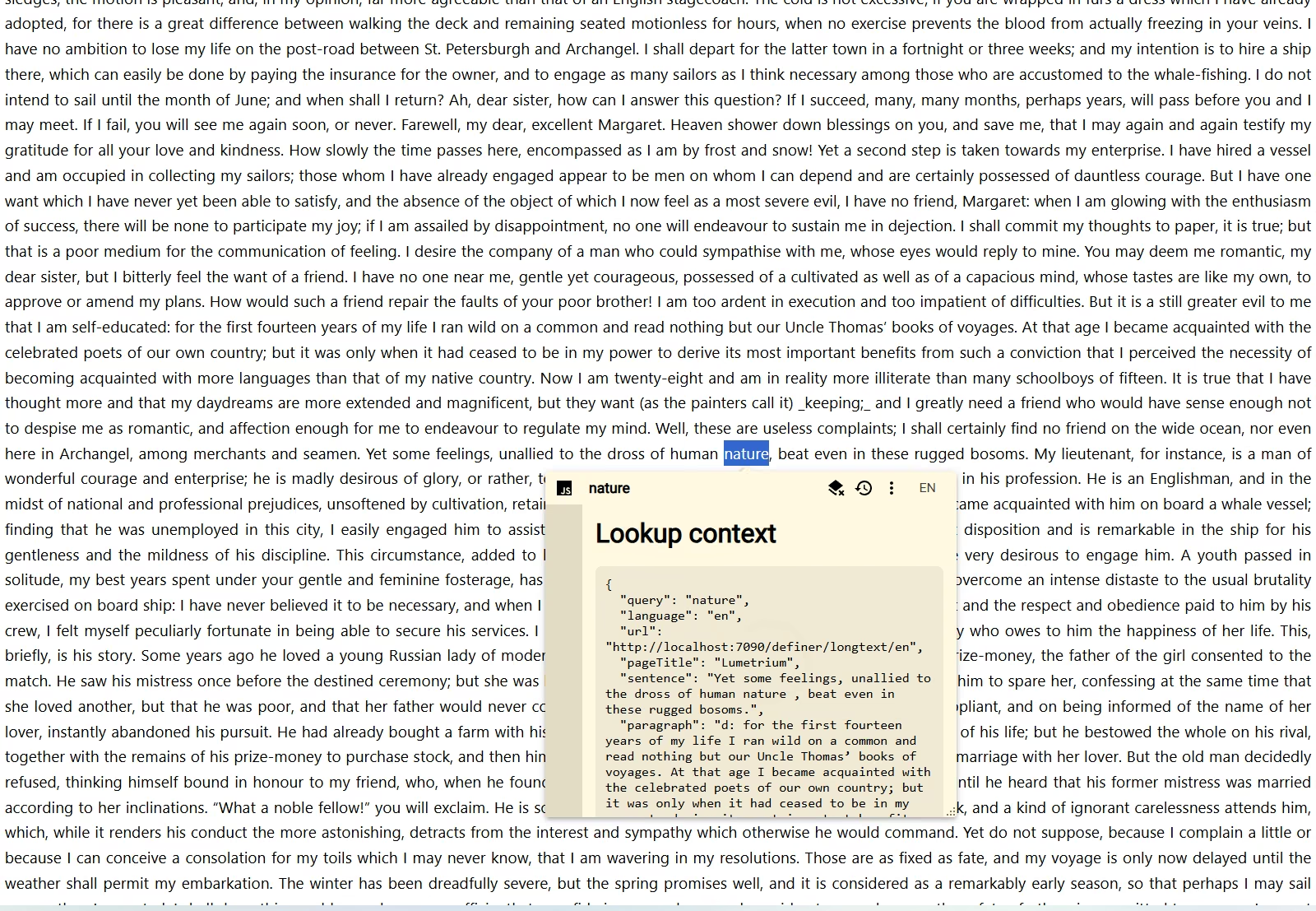
Setup
- Add or open a Script source in Definer Options.
- Replace the code in its editor with the script below.
- Save it and run a lookup from a regular webpage.
- Open the same lookup from history to compare which values were preserved.
Script
const pageText = definer.lookup.getVariable('page_text')
const context = {
	query: definer.lookup.query,
	language: definer.lookup.language,
	url: definer.lookup.getVariable('url') ?? null,
	pageTitle: definer.lookup.getVariable('page_title') ?? null,
	sentence: definer.lookup.getVariable('sentence') ?? null,
	paragraph: definer.lookup.getVariable('paragraph') ?? null,
	pageTextPreview:
		typeof pageText === 'string' ? pageText.slice(0, 500) : null,
}

definer.output.setHtml(`
	<section class="context-inspector">
		<h1>Lookup context</h1>
		<pre></pre>
	</section>
`)
definer.output.setCss(`
	.context-inspector { padding: 16px; }
	.context-inspector h1 { margin-top: 0; }
	.context-inspector pre {
		padding: 12px;
		overflow: auto;
		white-space: pre-wrap;
		border-radius: 8px;
		background: ${definer.theme.rgba('text', 0.06)};
	}
`)

document.querySelector('.context-inspector pre').textContent = JSON.stringify(
	context,
	null,
	2,
)
How it works
The script reads the query and active result language from definer.lookup. It requests url, page_title, sentence, paragraph, and page_text with literal definer.lookup.getVariable(name) calls, limits the page-text preview to 500 characters, and formats the collected values as JSON.
Literal variable names keep the requested values available when you reopen a saved lookup. A missing variable returns undefined, so Scripts should treat page context as optional.
Customize it
- Remove values that are irrelevant to your source.
- Add literal
getVariable()calls for other variables you intend to use. - Add
definer.lookup.sourcewhen you also need to inspect the current Source information. - Replace the diagnostic output with conditional behavior based on the values you find.
- Keep the output focused on the values you are testing.
Limitations
Definer does not save every possible lookup variable. A variable name assembled dynamically cannot be inferred for history unless the script also contains a literal access for each possible name.
Return to the Script Catalog.