Lookup Notes
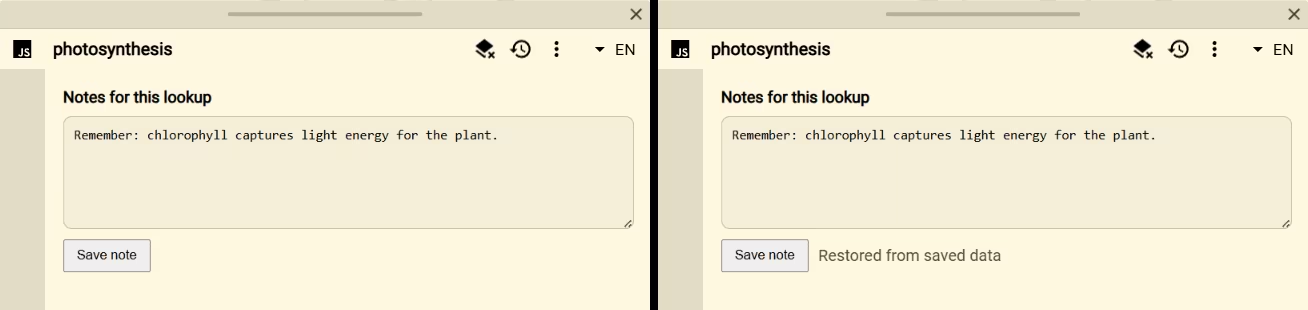
Lookup Notes adds a small note editor to every result. Use it to save a mnemonic, example sentence, correction, source reminder, or follow-up with the exact lookup where it matters.
Setup
- Add or open a Script source in Definer Options.
- Replace the code in its editor with the script below.
- Run a lookup, write a note, and select Save note.
- Reopen the same lookup result to confirm the note is restored.
Script
js
const saved = definer.result.getData()

definer.output.setHtml(`
	<section class="lookup-notes">
		<label for="lookup-note">Notes for this lookup</label>
		<textarea id="lookup-note" rows="6" placeholder="Add a mnemonic, example, or reminder…"></textarea>
		<div>
			<button type="button">Save note</button>
			<span role="status"></span>
		</div>
	</section>
`)
definer.output.setCss(`
	.lookup-notes { display: grid; gap: 10px; padding: 18px; }
	.lookup-notes label { font-weight: 600; }
	.lookup-notes textarea {
		width: 100%; padding: 10px; resize: vertical; color: inherit;
		border: 1px solid ${definer.theme.rgba('text', 0.2)};
		border-radius: 8px; background: ${definer.theme.rgba('text', 0.04)};
	}
	.lookup-notes div { display: flex; align-items: center; gap: 10px; }
	.lookup-notes button { padding: 7px 12px; cursor: pointer; }
	.lookup-notes [role="status"] { opacity: 0.7; }
`)

const note = document.querySelector('.lookup-notes textarea')
const status = document.querySelector('.lookup-notes [role="status"]')
note.value = typeof saved.note === 'string' ? saved.note : ''

document.querySelector('.lookup-notes button').addEventListener('click', () => {
	definer.result.patchData({
		note: note.value,
		updatedAt: new Date().toISOString(),
	})
	status.textContent = 'Saved with this lookup.'
})
How it works
The Script initializes the textarea from definer.result.getData(). Selecting Save note calls patchData() with the note and an ISO timestamp. Reopening the result restores that data and recreates the editor.
Customize it
- Add separate fields for an example, mnemonic, or confidence rating.
- Save on a deliberate button press, as shown, when readers may revise a note before keeping it.
- Use
setData()instead ofpatchData()if the note is the complete data model and older fields should be discarded. - Validate saved fields because an older result may contain a previous version of your data shape.
Scope
The note belongs to this Script Source, lookup, and result language. It is not a global notebook shared by unrelated lookups.
Return to the Script Catalog.