Multilingual Wikipedia Summary
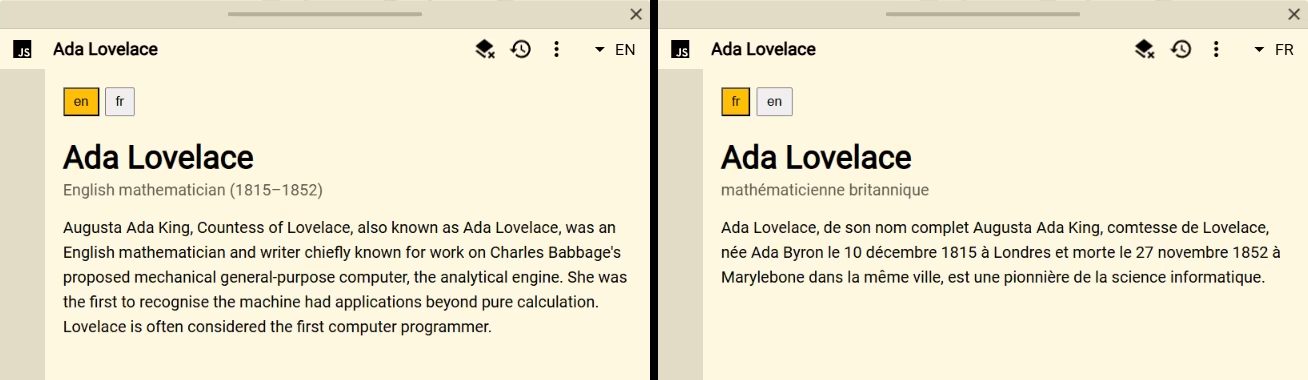
Multilingual Wikipedia Summary fetches a concise article introduction for the current query. Its language buttons use the result languages already configured in Definer, making the source useful for comparing the same topic across languages.
Setup
- Add or open a Script source in Definer Options.
- Replace the code in its editor with the script below.
- Look up a person, place, concept, or event.
- Configure more than one result language in Definer if you want language controls.
Script
const query = definer.lookup.query.trim()
const language = definer.lookup.language
const languages = definer.lookup.getVariable('langs')
const saved = definer.result.getData()

definer.output.setHtml(`
	<article class="wiki-summary">
		<nav aria-label="Wikipedia language"></nav>
		<h1></h1>
		<p class="wiki-summary__description"></p>
		<p class="wiki-summary__extract">Loading Wikipedia…</p>
	</article>
`)
definer.output.setCss(`
	.wiki-summary { padding: 18px; }
	.wiki-summary nav { display: flex; flex-wrap: wrap; gap: 6px; }
	.wiki-summary button { padding: 5px 9px; cursor: pointer; }
	.wiki-summary button[aria-current="true"] {
		color: ${definer.theme.cssVar('contrast')};
		background: ${definer.theme.cssVar('primary')};
	}
	.wiki-summary h1 { margin-bottom: 4px; }
	.wiki-summary__description { margin-top: 0; opacity: 0.65; }
	.wiki-summary__extract { line-height: 1.55; }
`)

const languageChoices = Array.isArray(languages) ? languages : [language]
const languageNav = document.querySelector('.wiki-summary nav')
for (const code of languageChoices) {
	if (typeof code !== 'string' || !code) continue
	const button = document.createElement('button')
	button.type = 'button'
	button.textContent = code
	button.setAttribute('aria-current', String(code === language))
	button.addEventListener('click', () => definer.lookup.activateLanguage(code))
	languageNav.append(button)
}

const heading = document.querySelector('.wiki-summary h1')
const description = document.querySelector('.wiki-summary__description')
const extract = document.querySelector('.wiki-summary__extract')

try {
	const wikiLanguage = language.toLowerCase().split('-')[0]
	if (!/^[a-z]{2,3}$/.test(wikiLanguage)) throw new Error('Unsupported Wikipedia language')

	const loadedFromSaved =
		saved.query === query && saved.language === language && typeof saved.extract === 'string'
	let article = loadedFromSaved ? saved : null
	if (!article) {
		const endpoint = `https://${wikiLanguage}.wikipedia.org/api/rest_v1/page/summary/${encodeURIComponent(query)}`
		const response = await fetch(endpoint)
		if (!response.ok) throw new Error(`Wikipedia request failed (${response.status})`)
		article = await response.json()
		definer.result.setData({
			query,
			language,
			title: article.title,
			description: article.description,
			extract: article.extract,
		})
	}

	heading.textContent = article.title || query
	description.textContent = article.description || ''
	extract.textContent = article.extract || 'Wikipedia returned no summary.'
} catch (error) {
	heading.textContent = query
	description.textContent = ''
	extract.textContent = error instanceof Error ? error.message : String(error)
}
How it works
The script reads the active result language and the literal langs lookup variable. It requests Wikipedia's summary endpoint for the active language, renders the returned title, description, and extract, and saves the selected fields with the lookup result.
When the same result is reopened, matching saved data avoids another request. Selecting a different configured language calls activateLanguage(). Definer activates that result language and reruns the Script, which requests or restores the corresponding summary.
Customize it
- Render additional fields returned by the summary endpoint.
- Link the title to a reviewed article URL from the response.
- Filter language buttons to editions you know are available.
- Replace Wikipedia with another language-aware knowledge service while preserving loading, empty, and failure states.
Limitations
Wikipedia controls article coverage, response format, and availability. A configured result language does not guarantee a matching Wikipedia edition or article.
Return to the Script Catalog.