JSON Formatter
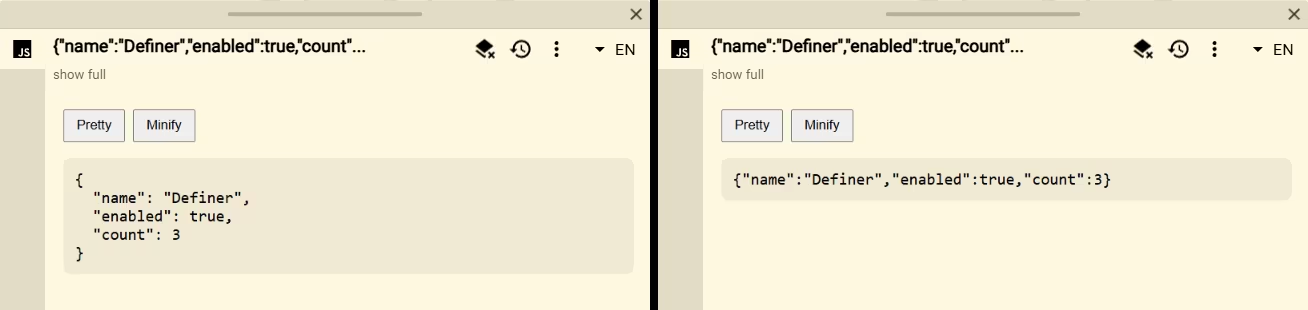
JSON Formatter pretty-prints or minifies JSON used as the lookup text. It is a compact developer tool for inspecting API payloads, configuration fragments, and escaped data encountered on a page.
Setup
- Add or open a Script source in Definer Options.
- Replace the code in its editor with the script below.
- Look up a complete JSON value.
- Select Pretty or Minify, then copy the result normally.
Script
js
const query = definer.lookup.query.trim()

definer.output.setHtml(`
	<section class="json-formatter">
		<div>
			<button type="button" data-indent="2">Pretty</button>
			<button type="button" data-indent="0">Minify</button>
		</div>
		<pre></pre>
	</section>
`)
definer.output.setCss(`
	.json-formatter { padding: 18px; }
	.json-formatter div { display: flex; gap: 8px; }
	.json-formatter button { padding: 7px 12px; cursor: pointer; }
	.json-formatter pre {
		padding: 12px; overflow: auto; white-space: pre-wrap; user-select: text;
		border-radius: 8px; background: ${definer.theme.rgba('text', 0.06)};
	}
`)

const output = document.querySelector('.json-formatter pre')

try {
	const value = JSON.parse(query)
	const render = (indent) => {
		output.textContent = JSON.stringify(value, null, indent)
	}

	for (const button of document.querySelectorAll('.json-formatter button')) {
		button.addEventListener('click', () => render(Number(button.dataset.indent)))
	}

	render(2)
} catch (error) {
	output.textContent = `Invalid JSON: ${error instanceof Error ? error.message : String(error)}`
}
How it works
The script parses definer.lookup.query once with JSON.parse(). Both buttons serialize the same parsed value with a different indentation level. Output is assigned through textContent, so strings containing HTML remain inert.
Invalid input produces the browser's parse error in the result instead of failing the entire Script source.
Customize it
- Add four-space or tab indentation choices.
- Sort object keys when canonical ordering is useful to your workflow.
- Add focused views for JSON Lines, JWT payloads, or selected object paths.
- Preserve the original text if duplicate object keys or exact whitespace are significant; parsing necessarily normalizes both.
Limitations
The lookup must contain a complete JSON value. JavaScript object literals with comments, trailing commas, unquoted keys, undefined, or other non-JSON syntax are rejected.
Return to the Script Catalog.